What is CDP? And, exactly how can it improve your PPC marketing? CDP stands for customer data platform. As a general overview, it’s a tool designed to organize your customer’s data from various platforms. It can strengthen your PPC efforts in various ways because you’re utilizing data-driven customer insights to develop your ad campaign strategy. Here’s how.
What is CDP?
As mentioned above, a customer data platform, or CDP, is a database that stores your customer’s data. It’s used to optimize your customer data management through centralization, data security, and customer data compliance.
What Does a CDP Do?
Depending on the software, some customer data platform capabilities have more than others. Generally, CDPs collect first-party customer data, including structured, unstructured, online, and offline. These sources are typically from your CRM, email, social media, in-store transactions, loyalty programs, and more. However, CDPs do more than collect and store customer data. They also organize them with segmentation and analyze them for you to create your ideal buyer personas and tailor your marketing strategies with data-driven customer metrics.
Benefits of a Customer Data Platform for PPC Marketing
CDPs can enhance your PPC campaigns because it’s designed for marketing. Here are the top advantages CDP advertising offers businesses:
Personalizes PPC Campaigns
CDP advertising personalizes your PPC campaigns through customer data segmentation. CDPs categorically organize customer data through behavioral, transactional, and demographic metrics to create unique customer profiles.
CDP examples of customer data categories include:
Spend groups, like average order value and monthly total spend
Location, birth date, and gender
Email open, click, and conversion rate
Last visited, purchased, and abandoned product
With a deeper understanding of your customer’s journey, you can customize your PPC ads to provide more value based on CDP data.
You can launch a PPC campaign to a segmented audience who never bought from you before to attract new customers. Then, launch another PPC campaign to another segmented list of past customers who haven’t purchased in a while to re-engage with them and increase CLTV. CDP advertising allows you to create more relevant ad content by optimizing your audience targeting for you.
Streamlines Bidding Strategies
CDPs make it easier for you to develop effective bidding strategies to improve the customer experience. Since CDPs also analyze customer data, your business can better utilize it for a more profitable ROAS.
You can calculate bids more accurately through automated bid management features. CDPs use AI and machine learning to analyze bidding algorithms and achieve greater ROAS based on the highest conversion value opportunities.
CDPs utilize prediction models and first-party data to display which users have a higher probability of converting. In return, you can leverage value-based bidding for greater profit. Some CDP platforms even integrate with big management platforms to centralize your advertising and marketing data into one place.
Improves Retargeting Campaigns
CDPs improve retargeting campaigns by connecting customer data to advertising data. They reduce average CPC for irrelevant audiences with access to real-time segmented customer data.
You’ll know which customers engaged more with your prior ads, the types they interacted with the most, and which advertising channels drove the most sales to strengthen your retargeting strategy. Some CDPs even automate activations to make advanced retargeting lists for you.
That way, you have data-driven strategies for retargeting campaigns to convert one-time buyers into repeat customers more effectively.
Delivers More Accurate Customer Data
CDPs constantly update their database to deliver the most accurate data than other sources because it’s collected directly from the customer. They enhance your customer journey reporting with quality and centralized data.
On average, 47% of new data collected by businesses have one or more critical errors. This same report showed that businesses receive customer data from 28 sources! With many decentralized data platforms, it risks your data accuracy, negatively impacting your paid search marketing efforts.
When you better understand your customer’s behavior and spending habits more accurately, you can better predict them to tailor your PPC campaigns and expand your market reach.
Maximize Your ROAS & Paid Search Results with Professional PPC Marketers
While customer data platforms do the heavy lifting in your paid search strategies, you can maximize your ROAS with professional PPC marketers. At Reach Marketing, we understand it can be challenging to utilize comprehensive CDP data effectively with many metrics available.
Our PPC team has extensive paid search experience to generate optimal results, including SEM keyword research, bid adjustment, A/B testing, and ad conversion tracking. We’ll continuously monitor your PPC marketing strategy with monthly reports to measure success and benefit your long-term business goals.
As a branded or used car dealership, you understand the importance of automotive social media marketing. But are you generating the results you’re aiming for? Dealership owners commonly make the mistake of posting on every social platform just to do it without data-driven metrics to develop their strategies, leaving them with little to no ROI.
Here’s a complete guide to social media marketing for car dealerships with content ideas to drive more sales.
A Guide to Automotive Social Media Marketing: Content Tips to Increase Sales
According to the CMM Council, leveraging social media marketing in the automotive industry more strategically can increase leads and sales. They reported that using natural language, big data analytics, and positive reputation management can deliver more meaningful social content based on your customer’s buyer’s journey.
Car shoppers aren’t always ready to buy immediately and don’t always want a “car for sale” in their feeds that feels spammy.
They also want personalized vehicle recommendations, to read dealer reviews, to get coupon offers, and even to engage with their favorite automotive brands’ social channels. In addition to transactional posts, consumers want informative and comparative car content before making a major investment.
CMM Council states that 38% of consumers will consult social media before buying their next vehicle, and 23% will use social media to communicate their purchase experience. By creating social media content at each marketing funnel stage, you can meet your target customers where they are in their purchasing process to generate more qualified leads.
Below are some automotive social media marketing strategies to consider and how they can benefit your bottom line.
Google Business Profile: Vehicles for Sale & Vehicle Listing Ads
Although Google Business Profile isn’t considered social media, it’s similar because you’re creating a profile online and sharing updates via that profile. It’s like a social media profile that lives in Google Search and Google Maps.
Vehicles for Sale is a module on your Google Business Profile that uses your dealership’s inventory to showcase specific listings to match a user’s search queries. Consumers can search and apply filters to navigate your inventory outside your website and learn more about it directly on Google.
Then, when they’re ready to get the vehicle they want, it’ll direct them to your dealership to buy it. This feature supports your local SEO because your specific vehicle listings can appear in related search results when local consumers are looking for them.
Vehicle Listing Ads
Vehicle Listing Ads is a feature you set up after you create an inventory data feed within Google Merchant Center. Google matches these details to potential buyers, utilizing the relevant vehicle makes and models they’re searching for.
It’s like a personal shopping assistant for car buyers. They can enter their desired features, like location, make, mileage, and price. Then, relevant Vehicle Listing Ads are shown, including dealerships that can ship it to them.
Google Business Profile Reviews & Customer Testimonials
Social proof can make or break car dealerships, especially as a local brand. Investing and maintaining your online reputation establishes trust for prospective car buyers by showcasing positive testimonials from real customers.
If you don’t have one already, create a Google Business Profile and ask happy customers to share reviews. Also, personally answer to the negative feedback that may occur over a template-based or no response.
Bad reviews are inevitable. But, you can control how you communicate and improve from them. Consumers will notice how you handle these.
Social Media Ads
In addition to organic social media content, creating ad campaigns is as crucial for auto dealers to increase lead acquisition and sales. When determining which social platforms to use, always conduct A/B testing for each ad campaign to see which type of content works first.
Also known as split testing, it sends different versions of your ad campaign to two audiences. We recommend only changing one element of your ad campaign instead of multiple to compare the results accurately. For example, you can use a single image ad for one group and an image ad carousel for another. Then, you can review which ad campaign had a better content performance to know which resonates best with your target audience.
You should also track KPIs and evaluate your ad’s monthly reporting metrics to see if your campaign is still working. If ad conversion rates are rapidly declining, you should re-evaluate your automotive social media strategy.
Now, let’s dive into the different social ad content ideas.
X advertisements with hashtag campaigns are an effective strategy to build brand awareness and attract new car buyers. In 2012, Audi launched a “#WantAnR8” X campaign to promote their R8 V10 model. It engaged the automotive community to win a free drive of their newest car by simply posting this hashtag on their accounts—receiving over 75,000 tweets!
Meta (Facebook) Ads
Meta makes it easy to create social ads for their family apps. You can create Facebook and Instagram ads all in Ads Manager. However, you must strategically create ad campaigns for each platform as they have unique formatting, audiences, and ad spend requirements.
Some car dealership social media ideas for Facebook ads are:
Facebook Canvas Ads: Use images and videos to showcase new car models or highlight the specific features your audience finds the most useful.
Facebook Lead Ads: Create retargeting campaigns for audiences who engaged with your previous ads to generate highly qualified leads.
Facebook Inventory Ads: Showcase your used, new, and vehicles in production inventories to sell cars faster when your audience knows where and when they’re available.
Some car dealership social media ideas for Instagram ads are:
Instagram Story Ads: Post video story ads that prevent users from swiping through, like contests for free one-year servicing or other prizes your audience finds valuable.
Instagram Feed Ads: Create ad copy that stops users from scrolling, like exclusive teasers for new vehicle launches or limited holiday campaign promotions.
Instagram Video Influencer Ads: Work with automotive influencers for video endorsements like “Get Ready with Me” to buy a car that takes them from their home to your dealership. Or videos of their online car shopping process with the car delivered to their home. This provides an immersive buying experience so consumers know what to expect when purchasing from you.
X (Twitter) Ads
TikTok Ads
Although you’re selling cars, you must remember that you’re selling to people, too. Using UGC of everyday people or influencer test drives and car walkthroughs/demos can drive more meaningful connections with your consumers. Their enthusiasm for the cabin amenities, infotainment features, and engine type gives a more visual ad experience.
LinkedIn Ads
LinkedIn ads are surprisingly showing success for auto dealers. Car buyers are likely working professionals, so meeting them on this platform can help them make a big purchase decision easier. You can maximize LinkedIn ad ROI with audience targeting, optimized budget allocation, and relevant content they find valuable.
According to Nielsen, effective LinkedIn ad marketing for dealerships includes:
Aspiration LinkedIn Ads: Displaying how your dealership meets and improves consumer needs, like non-luxury vehicle promotions, is 2X more likely to generate brand awareness.
Innovation LinkedIn Ads: Sharing new designs, like EV features and eligible government tax credits, is 2.3X more likely to increase customer recommendations.
Loyalty LinkedIn Ads: Showcasing your commitment to customer loyalty, like free annual services or anniversary discounts, is 47% more likely to drive favorability.
Pay-Per-Click (PPC) Ads
Did you know that 66% of automotive calls generated by search engines are from PPC search ads? This study shows that phone calls convert 10 to 15X more revenue than web leads. For this reason, creating PPC search ad campaigns with click-to-call buttons can strengthen its performance and click-through rate.
With many users browsing the web on mobile devices, you can personalize and streamline their car-buying process by enhancing the customer calling experience.
YouTube Ads
Entertainment is everything with YouTube video ads in automotive social media. Creating engaging ad visuals builds excitement with your audiences for new vehicle launches. Use engine revving audio, trending upbeat music, and large text so consumers can also experience your ads on mobile devices.
New Vehicle Launch YouTube or TikTok Videos
Build more hype for new vehicle release videos on YouTube and TikTok. You can make short and long-form videos on YouTube and then short-form videos on TikTok.
Some dealership social media ideas for YouTube and TikTok posts are:
New model year sneak peeks
New vehicle launch countdowns
Influencer new vehicle promos
Behind the scenes of design studios and testing facilities
These videos act as product spotlights, building excitement with potential customers for upcoming vehicle releases because they’re entertaining and informative.
Facebook Educational Content
Did you know that Facebook is the most popular social media platform consumers use to hear about new cars? A Facebook IQ study shows that people use their family of apps (Facebook, Messenger, Instagram, and WhatsApp) more for vehicle discovery than any other social network.
CMM Council also reports that 84% of car shoppers are on Facebook, and 24% use this channel as a resource for buying their next vehicle. Consumers want to learn more about what they’re purchasing and don’t want to buy blind—especially since cars are a big purchase.
That’s why creating educational automotive social media content on Facebook is crucial. It shows that your dealership is an authority in your industry by becoming a reputable resource for them to reference.
Some car dealership social media ideas for educational Facebook posts are:
Car buying tips
Financing guides
Model year and competitor automaker comparisons
Used car recommendations shared as blog post links
In return, sharing informative content increases your market reach and brand awareness by generating more organic traffic to your website.
Instagram Engagement Content
Automotive social media marketing is primarily visual-based, making Instagram a key platform for your business. In addition to image posts and Reels, you should create engaging content. Interacting with your audience is imperative because it increases your content’s engagement metrics and performance.
Some car dealership marketing ideas for engaging Instagram posts are:
Discount giveaways
Favorite used car brand polls
Personalized vehicle recommendation Q&As
Virtual showroom tour live streams
With Instagram engagement content, you gain valuable insights from your followers. You’ll discover which type of posts they interact with the most, allowing you to tailor your social strategy for better results.
Who better to get feedback from than the people you’re trying to reach?
X (Twitter) Trending Posts
Staying current on X by posting with trending hashtags helps you stay engaged with the automotive community. As a local branded dealership, you can join the discussion with your OEM’s posts. They might engage with your post by liking or reposting it, which increases its reach and impressions from their larger following while the topic is still relevant.
LinkedIn Thought Leadership Posts
As a dealership owner, acting as a thought leader in your field and networking with fellow dealerships can build your credibility. A leading presence resonates with potential customers when they see you’re a reputable seller and resource they can depend on.
A case study showed that Cox Automotive generated 61.8 million media impressions across major networks, including USA Today and Automotive News, with thought leadership marketing. They shared in-depth perspectives of the automotive industry, consumer preference projections, and interviews with fellow thought leaders.
Some car dealership social media ideas for LinkedIn thought leadership posts are:
Commenting on the automotive industry and car buying trends
Sharing current car shopper challenges and innovative solutions
Providing tips on ways dealerships can better serve their customers
Advising on ways OEMs can better support their local branded dealerships
Recapping automotive industry events and how other dealerships are succeeding
Create LinkedIn thought leadership content from an authoritative perspective using your own storytelling and success stories.
User-Generated Content (UGC) Reposts
UGC is one of the easiest and most effective automotive social media marketing strategies because you don’t have to create original content. Sharing posts from previous happy customers tagging you on their personal social media platforms is free-of-mouth marketing, and it generates up to 40% more engagement and 10% more dealership sales!
Additionally, consumers may see your UGC posts from their peers or non-influencers, acting as further social proof from someone they can relate to. Studies show that 92% of consumers trust recommendations from earned media and are 71% more likely to purchase from social media referrals.
Drive More Sales with an Automotive Social Media Marketing Team
With many social media and advertising platforms and consistent testing to ensure your strategies are successful, it can be challenging for dealership owners to navigate. You have to invest consistent time and resources while managing your business.
At Reach Marketing Pro, we have extensive experience in automotive social media management. We’ve worked with local branded and used car dealerships and know how to effectively create social content and ad campaigns on various platforms for your bottom line.
Our Dealership VIP Program helps streamline your vehicles in production pipeline to sell more cars before they arrive on your lot. We make it easier for your consumers to pre-order vehicles with user-friendly reservation pages, and we’ll even manage your Google Drive spreadsheets.
Our Absorption Boost services for auto dealers can also revamp your website with optimized designs on your service department center, car parts, and specials pages to boost your fixed operations. We combine stronger visualization, QR code functionality, and data-driven SEO to custom-build these web pages within your website and OEM guidelines.
No matter which service you choose, we’ll continuously monitor your marketing strategies with monthly reporting to ensure they generate results that support your long-term goals.
Need help deciding which service is best for your dealership?
You know the importance of creating graphics for your content. But is it effectively supporting your business’s content marketing strategy? Visuals play a crucial role in your digital marketing efforts. It’s how your target audience will first absorb your content immediately.
If the graphics don’t align with your unique brand, are overdesigned, or don’t connect with the written content it’s paired with, users will quickly scroll past it.
That’s where Canva comes in. You may already be familiar with or heard of it, as it’s one of the most used graphic design platforms because it’s user-friendly.
Whether you have a graphic designer, a content marketer, or doing DIY, here’s how to use Canva to create stunning graphics that support your bottom line—even if you’re not design savvy.
Canva: How to FAQs
Anyone can learn how to use Canva, regardless of whether you have prior graphic design experience. Here are some of the most FAQs if you’re new to this application.
What is Canva?
Canva is a graphic design platform for creating content visuals. You can use it for free or buy a Canva Pro subscription to access premium features, like exclusive stock imagery
Is Canva Easy to Use?
Canva is easy to use because it offers template-based designs to create graphics. Although you can design visuals from scratch, it’s designed to be user-friendly with its template editor-based application.
What is Canva Used For?
Canva can be used for vast types of content marketing, including social media posts, blog infographics, flyers, and paid ad creatives. However, it can do more than content marketing, like resumes, cover letters, and sales slideshows.
How to Use Canva to Create Effective Digital Marketing Content
Did you know that visual content receives 94% more views than text-only content? That’s why, you must create compelling visual content to increase brand awareness, market reach, and even SEO.
Here’s a step-by-step guide on how to use Canva for digital marketing to ensure it’s effective.
Understand Your Content Marketing Goals First
What are your content goals with the graphics you want to create when using Canva? Knowing the purpose of the visuals you’re designing is more than where they go. It should also support your content marketing goals.
For example, if you want to increase engagement on a social media post, consider visuals that interact with your audience more, like polls or giveaways. That way, you create the best graphics that support your content strategy.
Choose a Design Template
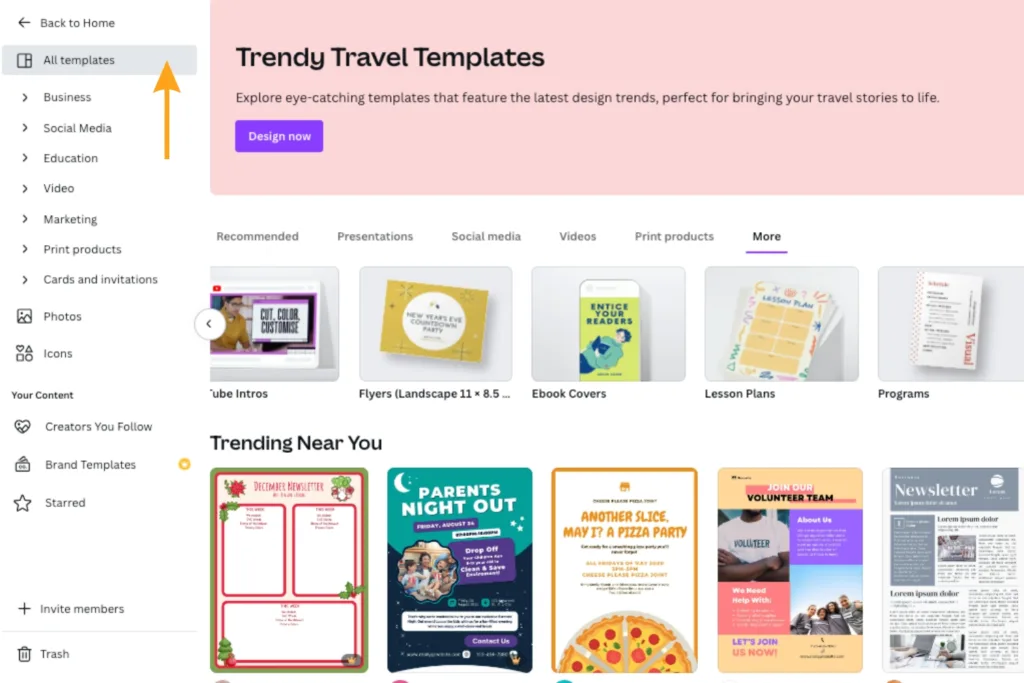
Once you create a Canva account, you’ll see a Home dashboard view. If you want to use Canva’s pre-designed templates, click Templates on the left-side navigation bar underneath Projects. They offer free and paid Canva Pro templates organized into various categories and subcategories.
These template categories include content types like social media, videos, and themed designs like holidays and industries. It even provides platform-specific specs, like Instagram image ad carousels and LinkedIn profile banners for you.
Customize Your Design Template
After selecting your template, next is customizing it—one of the most impactful design steps you take. While Canva’s templates are a solid foundation, you must tailor the visuals to your brand and target audience.
Don’t get overwhelmed with this part. Canva makes it simple to customize your graphics with its design tools on the same left-side navigation bar. You can drag and drop various elements, including photos or videos from their stock visual library, pre-designed headings, shapes, and more.
Customizing your Canva design templates should include:
Matching Your Branding Visual Guidelines
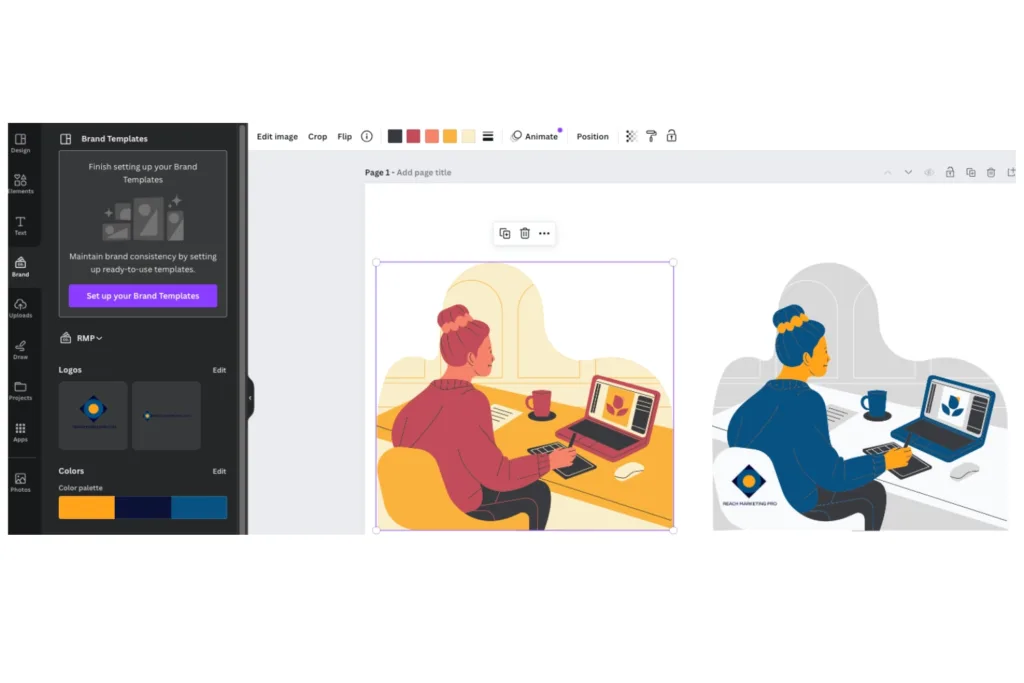
Update the template with your company brand colors, fonts, and logo. The templates or graphics will show a color palette used in the visual at the top of your design draft. You can even set up your branding guidelines under Brand Templates to save it for future designs. Brand Template includes your logos, brand colors, fonts, voice, and more.
Aligning Your Brand’s Messaging
Write with your brand’s tone, audience, and platform it’ll be on in mind. Does your business use humor like memes? Do you want a corporate tone with simple and professional graphics? Will these visuals be placed on your website’s home page or business cards?
Consider your company’s personality and where the graphics will go when creating text. That way, you’ll know how much to write, the font size to use, and how to develop your messaging.
Personalizing Your Visuals
Include original product, event, or staff images when possible. If you want to get creative, you can even draw on your graphics with multiple width points, highlighters, and colors. Other design features include free screen recorders for tutorials, photo filters, and image frames.
Download Your Created Content
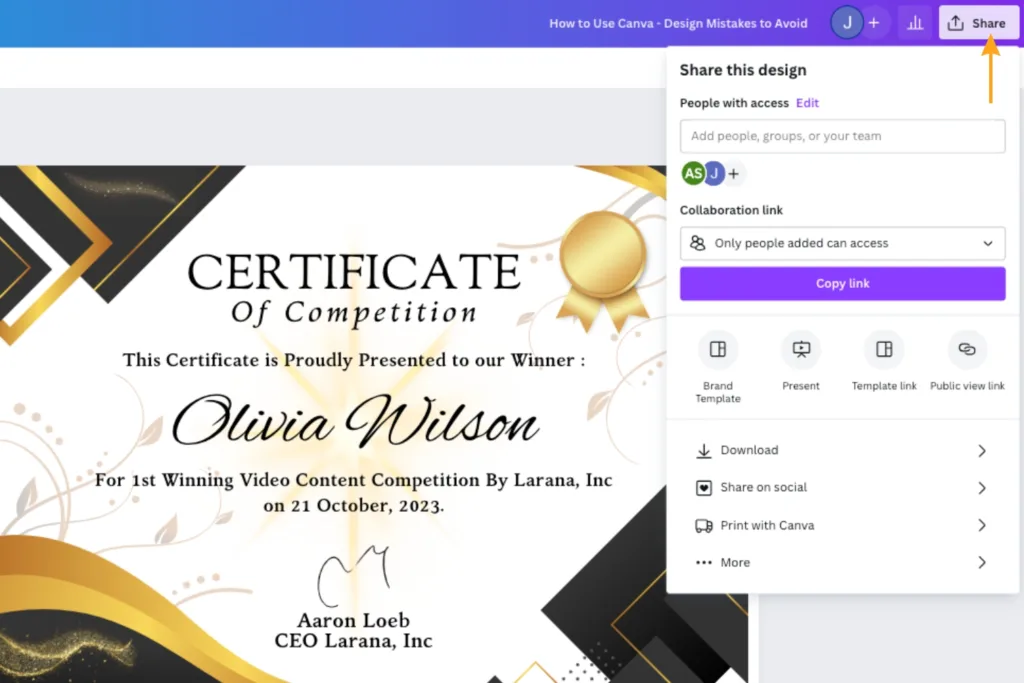
Once your graphics are created and reviewed, the last step is downloading them. In the top right corner, click Share ⬆ and click Download ⬇ in the drop-down menu.
You’ll find seven download file type options:
PNG: Best for complex images and illustrations
JPG: Best for sharing
PDF Standard: Best for sharing documents and emailing
PDF Print: Best for printing documents
SVG: Best for web design and animations
MPG: Only for high-quality videos
GIF: Only for short clips with no sound
Using the correct download file for your graphics ensures they have the proper formatting.
Common Canva Design Mistakes to Avoid
Avoiding design mistakes can seem daunting, especially if you don’t know how to use Canva. Luckily, Canva offers help pages like its Design School, offering free lessons and courses on using its tools for the most effective designs. They also have a Learn blog where you can learn more tips on graphic design, branding, content marketing, and more.
In addition to Canva’s resources, here are some of the most common design mistakes to avoid when using this platform.
Overdesigning Graphics
Don’t overdo the elements in your graphics. It can harm your content performance if it’s over-designed.
Common overdesigning mistakes businesses make when using Canva include:
Too much text
Not enough white space
Overstretching images that become blurry
Font on dynamic patterned backgrounds
Too many font styles
Overdesigning graphics can confuse and overwhelm users because there isn’t a focal point. It can also harm your website’s content rankings due to poor image SEO practices.
With Search Generative Experience becoming more widely used, if Google can’t match your graphics with what users are looking for in Image Search from poor image quality, you can miss ranking and customer opportunities.
Share a collaboration link to test your graphic designs with your colleagues. Click Share ⬆ in the top right corner, next to your image file name. You can set specific user permissions to give people access to your draft if they want to hop in and design or share a Collaboration Link as a preview only.
Under-designing Graphics
Using Canva for graphic design shouldn’t just be copied and pasted if you want to create stunning visuals that support your content marketing strategy. While stock photos and pre-designed graphics work for some companies, you can gain a competitive advantage with brand awareness through personalized visuals.
Common under-designing mistakes businesses make when using Canva include:
No logos
No brand tone or personality
Misaligned branding design guidelines by using different fonts and colors
Not editing the template enough or at all
As one of the most popular content design platforms, people can likely spot a Canva graphic without customization. It’s like ChatGPT. You can spot pre-created content by the way it’s written or designed due to its template.
Remember, Canva is your canvas. You’re the creator!
Not Considering User Experience
If your audience has trouble reading your graphics on mobile or if the visuals are random for the written text it’s paired with, you risk poor user experience (UX) design in your content. UX design impacts all facets of content marketing, including website design, SEO, and conversion rates. You must make it easy for your audience to understand and absorb your graphics—or your competitors will.
Common UX design mistakes businesses make when using Canva include:
Hard-to-read fonts
Lack of contrasting colors to balance the visual
Not resizing graphics for various platforms
No clickable URLs when applicable (products, CTA buttons, etc.)
Mixed brand messaging—unclear what you’re selling, inconsistent imagery, etc.
Irrelevant stock photos or graphics
To prevent UX design mistakes when using Canva for graphic design, ensure you test them first. Send Collaboration Links to colleagues and have them check how the visuals look on desktop and mobile. Using graphics as part of the same series can maintain more brand consistency if you’re creating multiple ones within the same project.
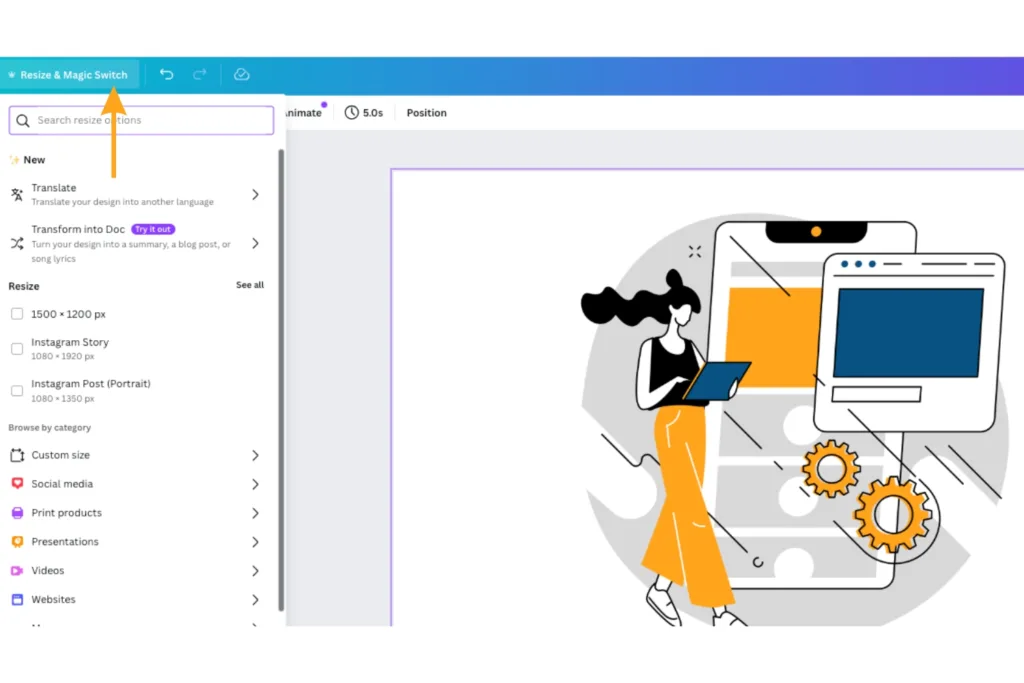
Lastly, always resize your images if you’re using the same graphics for different platforms. With a Canva Pro account, you resize graphics instantly via the Resize & Magic Switch tool in the top left corner of your design draft.
If you don’t have Canva Pro, you can copy and paste your design into a blank project with the right specs, but it requires manual re-positioning of your graphic elements.
Elevate Your Content Marketing Graphics Beyond Templates
While Canva makes it simple to create visuals and customize their templates, working with professional graphic designers can elevate your content marketing strategy. Graphic designers offer more competitive positioning, brand consistency, and customization options with non-template-based applications with more design capabilities.
At Reach Marketing Pro, our graphic design services can personalize your visuals to enhance your content marketing further. We have extensive experience in web design, digital/print publications, packaging, motion graphics, original illustrations, and more.
Contact us to help bring your brand’s vision to life!
As an online store, building and designing your website is an exciting journey that can make or break your brand if it’s not done properly. In a saturated e-commerce market, your brand must stand out while making the shopping experience seamless. Luckily, plenty of user-friendly website design platforms are available to help—even if you’re not web design savvy.
Shopify is one of the best e-commerce website builders because they offer you pre-designed site templates, built-in payment processors, and more. So, how can you ensure you reach customers while developing a Shopify site that’s powerful enough to remain competitive?
Below is a 10-step guide on how to create a Shopify website with design and build tips, along with mistakes to avoid.
How to Create a Shopify Website: A 10-Step Guide to Building & Designing a Powerful E-Commerce Site
E-commerce brands need a compelling Shopify site to support their bottom line. It helps you build brand awareness to reach new audiences, strengthen online visibility to stand out among competitors and increase conversions to sell more products.
Here’s how to create a Shopify website in 10 steps to help you effectively achieve your business goals.
1. Set Up Your Shopify Store
The first step to starting a Shopify store is account creation. You’ll need to enter a domain name for your website, store name, time zone, and currency type. A domain name is your website’s URL and automatically defaults to a “myshopify.com” URL. If you prefer a “.com” URL, you must create a custom domain name by buying one from Shopify or a third-party domain provider.
A benefit of purchasing domain names from Shopify is that they come with a TLS certificate, so you don’t need to buy SSL encryption for your domain to secure your site. Pricing will vary, with annual registration and domain renewal fees separate.
Your store name is what your customers see, which should be catchy, memorable, and unique to your brand.
Some tips for creating a Shopify store name include:
Make it simple to remember, spell, and pronounce.
Add a keyword, if possible.
Keep it short.
Don’t use numbers, hyphens, or long names.
Reflect your brand’s missions, values, or personality.
If you need help creating an online store name, Shopify offers a free business name generator to guide you as creative inspiration.
2. Select a Design Theme
After setting up a Shopify store, the next step is the site’s design theme. Selecting themes is one of the most impactful decisions you’ll make. Your Shopify store design affects how customers understand your brand and shop on your website.
With plenty of free and paid website design templates available in the Shopify Theme Store, it can be challenging to know which is best for your business.
Consider the following when selecting Shopify design themes:
Product Inventory: How many products do you plan on displaying? Some themes offer one-product stores and product catalog designs.
Features: Decide your must-have vs. nice-to-have features, like home page image slideshows, Instagram feed, related products, and quick buy. You can also search by theme feature in the Shopify Theme Store.
Updates: Can you easily rearrange or remove page sections or simply install plug-ins without updating the site’s code?
Budget: Is purchasing a paid theme worth the investment?
Industry: Look at their offered industry-specific themes if it suits your brand, like restaurants, pet supplies, and clothing.
After deciding on your Shopify store design theme, the next step is customizing it.
3. Customize Your Theme
When you design a Shopify website, you must customize its themes to align with your brand and user experience (UX). Your site should be easy for customers to navigate with an immediate understanding of your brand’s unique identity.
If consumers can’t find products quickly with organized product category pages, have fast loading speeds on mobile, or access site breadcrumbs to return to a page, they’ll leave because of poor UX. Recent research reports show that 60% of e-commerce site traffic comes from mobile devices, and only 64% will load a page two to three times before leaving.
When customizing your Shopify design theme, include the following UX design tips:
Use your brand colors, fonts, and tone in your website copy.
Add site breadcrumbs for easy navigation and shopping.
Incorporate mobile-friendly designs, like white space and larger fonts, for easier readability.
Avoid overdesigning, adding too many call-to-action (CTA) buttons, and text-heavy pages that can overwhelm visitors.
Compress quality images and videos to reduce load speed times.
Don’t get too hung up when you design a Shopify website where it prolongs your site launch. Minor edits can always be updated post-launch.
4. Install Your Necessary Plug-Ins
When you build a Shopify store, consider the possible plug-ins you may want to install. Plug-in applications are commonly used to add custom features to enhance your site design and UX.
Common plug-ins used for Shopify sites include:
Live chats
Social proof widgets
Product search filters
Custom contact forms
SEO plug-ins
Shopify offers plugins in the Shopify App Store with simple one-click installation, or you can insert a link to install a third-party plugin. If you’re using a custom plug-in app from a web developer, they must provide you with an installation link specific to your store, as it cannot be used on another store.
5. Write & Upload All Website Content
Your website’s content is as crucial as its design. The written content displayed on your web pages impacts how your brand is perceived and how your site is structured. To write content that ranks on Google, it must be relevant and helpful. Google rewards quality content with best optimization practices.
Avoid lengthy paragraphs, overlinking, and irrelevant content. For example, don’t create a blog post meant to educate users about an industry-related topic and then solely promote your products instead—also known as search intent.
This common content writing mistake not only pushes readers away because that’s not what they’re searching for but harms your rankings, too.
While every Shopify site is different, you’ll need the following foundational content:
Product images, prices, inventory SKUs, etc.
Product category pages
Individual product page titles and descriptions
Product variations: styles, colors, weights, specs, etc.
Main site pages: Home, About Us, Contact Us, Cart, Checkout, etc.
You can also streamline your product page content by importing them in bulk via a CSV file.
Depending on your online store and brand, you may need additional website content, like an FAQ page for technical items and how-to-use directions or an in-person store location finder page.
6. Optimize Your Shopify Site forSEO
Written content not only reflects your brand and UX but also your SEO for users and search engines to find. It impacts how your website ranks in the SERPs to produce more organic traffic.
On-Page SEO: The content on your website pages, including metadata, internal links, image alt descriptions, keywords, and best SEO copywriting practices. This step ensures that Google can understand what your website is about when linking to it in relevant user search queries.
Off-Page SEO: The information “off” your website pages, including backlinks, social media, and online reviews. This step ensures that your website is trustworthy with its content relevancy and Domain Authority.
Technical SEO: The technical information “behind” your website pages, including indexing, crawling, and clean structured code (HTML/CSS/JavaScript). This step ensures that Google can discover and store your site content in their database.
You can waste tremendous effort building a website on Shopify if it isn’t optimized. Without SEO optimization, your website is essentially invisible online, as users and search engines cannot discover it.
7. Set Up Payment Processing
The next step in setting up a Shopify store is your payment processing, and it’s really simple. Shopify offers built-in payment processors with sales tax and multiple types of shipping rates. Their shipping options include flat, price-based, weight-based, and free shipping rates.
Shopify Shipping also helps calculate your shipping rates to simplify order fulfillment based on default shipping zones and profiles.
Next, all you have to do is enter your bank account information in your Shopify Payments account, select the shipping rate you want, and click Activate Shopify Payments in your Payments settings.
8. Review Your Shopify Site Pre-Launch
You’re almost at the finish line! Now that your Shopify build website is almost complete, review it before going live to ensure it’s functioning properly.
Error-free written content, like typos and grammatical errors
Site security and website data backups
Unique page titles and metadata
It’s common to find minor issues post-launch and can easily be updated, so don’t get too hung up on this phase either that can prolong your site going live.
9. Launch Your Shopify Website
Now congratulate yourself on your new website launch! While the celebration is well-deserved, you should have a marketing plan to further promote your site. Consider cross-promotional social media posts, email blast announcements, and countdown campaigns to let your target audience know you’re officially live and they’re free to shop at your store.
This step is especially crucial for small business websites to increase brand awareness for a wider audience reach.
10. Review Your Shopify Site Post-Launch
While a website launch is a significant accomplishment, it doesn’t end there. Always double-check your site after going live to ensure everything is working properly.
User surveys to get website feedback from real visitors
Also plan for ongoing maintenance, such as plug-in updates and outdated information to avoid a complete website design revamp.
Start Your Shopify Journey On the Right Foot with Professional Web Design & Development
Although Shopify makes it simple to design and build a site on its platform, working with web designers is the best investment you can make. As an e-commerce business owner or key stakeholder, you have to manage your business while being an expert in your trade.
Various factors can also go wrong, especially if you don’t know how to create a Shopify website—which can cost more time and resources to fix than hiring web designers from the start. A Shopify site is a significant investment and should be designed and developed by professionals to maximize your results.
At Reach Marketing Pro, our in-house web development and design team has extensive experience creating Shopify sites. We’ll walk you through each step to ensure your website reflects your individual brand, supports your business goals, and is optimized for online visibility.
Our services also include ongoing website maintenance and management, like technical site updates, adding more pages, and ensuring your website consistently performs as it should. We provide full transparency to your website performance with monthly reports to measure and track success.
Ready to start your Shopify journey on the right foot?
Artificial intelligence (AI) is going to replace digital marketing. AI doesn’t create original content. These are common, yet understandable experiences of AI marketing for business owners in today’s online realm. It has disrupted the digital marketplace in almost every facet, including graphic design, advertising, SEO, and VR.
Since it’s still relatively new, there are risks of improper use of artificial intelligence and marketing. Unedited AI-written content has become unintentionally plagiarized and customer service chatbots have human language constraints. Whether you’ve adopted marketing AI or not, it’s here to stay and will only evolve.
So, how does your business successfully adapt to emerging AI technologies?
Learn more about the current trends in AI, our future predictions based on trending insights, and how you can better embrace AI to enhance your digital marketing strategies.
5 Artificial Intelligence Current Trends in Marketing
AI’s impact on marketing is vast with many automated features and applications offering businesses new ways to optimize their online presence. Below are the five most popular AI marketing tools used currently and the benefits they’re providing.
AI Content Writing
You’ve most likely heard of ChatGPT as one of the most used AI platforms for content writing today. ChatGPT was a groundbreaking AI chatbot that revolutionized the way we create content online. Grammarly also had a major industry influence and changed how we proofread content with prompted edit suggestions.
Some of the most popular generated features of AI content writing tools include:
Content topic ideas and outlines
Content analysis and summaries
Content editing
Coding language
Text production
To avoid AI content writing applications from doing more harm than good, you must use it as a foundation—not a complete solution. Copying and pasting generated content without checking if the information is accurate and editing it to create unique content puts your business at risk of distributing misinformation or even plagiarism, as it’s largely unregulated and still new.
We’ve seen the rise of AI content writers specialized in integrating artificial intelligence to optimize their content creation processes. AI marketers enter detailed prompts with preliminary research to generate more accurate and humanized AI-written content faster. Web programmers generate code to write, debug, and analyze coding languages to save time.
Generate ideas from AI content creation applications to get creative inspiration instead and stay up-to-date with changing AI copyright laws. It will help streamline your content creation workflows while preventing legal challenges.
Search Generative Experience (SGE)
Many people have interacted with Search Generative Experience (SGE) largely for its famous AI image generator. Users can enter random image details and SGE acts as a graphic designer bot to create the exact visual you prompted. However, businesses are now using SGE to strengthen their SEO.
Some of SGE’s most popular SEO features include:
AI-powered SERP overviews
Product and shopping ad image searches
Follow-up question-based search queries
Google Business Profile snapshot previews
SGE doesn’t replace standard SEO. It relies on human-written content to generate results. That’s why you must know how to leverage both to deliver the best, most relevant, and most streamlined search results possible to your target audience when looking up information related to your business online.
To accomplish this, you must optimize your website for Google AI search. Create quality E-E-A-T content with strong backlinks, metadata, and user experience (UX) that SGE algorithms reward. SGE can create a generated overview of your site’s information while linking back to it if you create a higher standard of information quality for your users with traditional SEO optimization.
Also, utilize SGE website audits to identify the most important keyword rankings you can’t afford to lose first. It provides an SGE impact analysis to measure your site’s SGE-SEO performance to see how it’ll perform in Google’s AI search engine.
Customer Service Chatbots
Although customer service chatbots have been around for some time, there are new AI marketing features that are increasing their capabilities.
Some of the most popular customer service chatbot features include:
Decision-tree prompts to transfer customers to the correct departments
Deeper understanding of conversational customer language
24/7 customer service support
With advanced automated features, chatbots are solving customer service issues without the need for phone operators, reducing call wait times and bottlenecks contributing to poor customer satisfaction.
Project Management Automation
Popular project management AI tools, like Asana, Jira, and Monday.com, are widely used in businesses for organizing and streamlining their internal workflows.
Some of the most-used project management automated features include:
Task triggers and rules
Recurring tasks
Customized task deadlines
Team project collaboration spaces
Multiple task list views (lists, boards, calendars, etc.)
Having an automated project management platform is a requirement for businesses nowadays. Without an application that centralizes your tasks and team, it’s like operating in the dark.
AI Advertising
Advertising with AI marketing offers more personalized ads and audience targeting to streamline purchase decisions. With advanced predictive analytics and audience segmentation, AI advertising can categorize personas at each stage of the marketing funnel with web behavioral insights.
They can assess which advertising platforms and materials have the best performance for specific groups of people through views and engagement metrics. That way, businesses can better personalize how they create ads for each persona and connect with them where they are on their buyer’s journey for a hyper-personalized shopping experience.
Popular AI advertising features include:
Real-time bidding
A/B testing optimization
Advanced audience segmentation and targeting
Predictive ad performance analysis
When you understand your ideal customer’s online behavior, you can better predict how they’ll respond to your content and provide customized solutions.
5 Predictions On the Future of AI in Marketing
Based on these current AI marketing trends, how will AI affect marketing in the future? While it’s hard to know exactly how far advanced AI will become and how fast it will evolve, we predict the five following future trends will occur:
Stronger Understanding of Branding Guidelines & Human Language
One of the biggest challenges that AI marketing platforms currently face is their understanding of the human language. People nowadays can spot AI-written content as it uses the same robotic tone with long run-on sentences and fluff that doesn’t sound human.
Based on these constraints, we believe that AI digital marketing tools will advance their machine learning processes to reduce the humanization required. We predict that they’ll have a stronger contextual awareness and understand personalized tones to generate more uniquely branded content.
Advanced Customer Behavioral Analysis
While engagement analytics are available in AI marketing platforms, we believe that their consumer behavioral analysis will advance with more comprehensive data insights. They’ll be able to achieve more accurate campaign performance predictions with greater machine learning tools.
We think AI digital marketing tools will have an increased awareness of consumer behavioral trends and ROI projections to help businesses stay ahead of the competition by using consumer data more effectively in their marketing campaigns. AI is designed to continuously learn, so we believe it will help brands make better data-driven marketing decisions in real time.
Enhanced Ad Target Marketing
AI advertising platforms currently have predictive analytics, and we foresee this feature will be enhanced in the future to strengthen audience targeting. They’ll be able to build audience profiles more accurately with their advanced customer behavioral analysis and segmentation.
These tools will be able to analyze comprehensive user data, personalize human language, and offer behavioral prediction analytics based on these valuable insights. It will automate and fine-tune businesses’ buyer persona profiles to better target the right audiences.
However, we think integrating AI advertising with traditional marketing strategies will remain imperative to achieve the most accurate results until new capabilities become available.
AI Integration with AR & VR
The future of AI in marketing will most likely evolve more into AR and VR. We predict VR assistant avatars with detailed rendering will replace chatbots to provide a more “human-like” shopping experience. It’ll be able to try on clothes in different colors and make styling suggestions based on your home’s specs, customer profile, and purchasing history.
While brands like Amazon currently have AR camera views, like seeing how furniture looks in your home before buying, it will become more interactive and advanced.
AI will also utilize enhanced sensory technology for AR to create a real-life immersive experience where simulations can interact with dynamic environments in the real world better.
AI Video Marketing: Pre & Post-Production
Video marketing currently utilizes AI tools for features like viewer behavioral analysis data on live streams and generated video content. While AI video marketing is being implemented, we believe it will enhance pre and post-production processes more efficiently. It will be able to edit raw footage, transcribe audio to create scripts, and render higher-quality animations faster.
However, until new advancements are made, we believe that video marketers will still need to edit AI-powered video content to ensure it’s AI copyright compliant.
Generate Better Results with AI & Human-Driven Marketing
Although AI can do most of the heavy lifting, it doesn’t replace professional digital marketing. That’s why combining human-driven and AI marketing is imperative when marketing your business online while it’s still new.
At Reach Marketing Pro, we have extensive experience with humanizing and tailoring AI-enabled marketing to optimize your strategies for the best results possible. We’ll also keep you informed throughout the process with monthly performance reports to measure and track success.
Ready to stop worrying about AI and embrace AI digital marketing?
You may know how to write content for a website. But to create high-quality content that ranks high on Google’s SERPs is a different ballgame. It requires an SEO content strategy with target keywords (that aren’t just the highest volume and lowest keyword difficulty), optimization, and unique storytelling for each piece to connect with your audience.
SEO content writing is a major facet of digital marketing today. If you aren’t writing for search engine optimization and your consumers effectively, your brand is essentially invisible online in a competitive digital market.
Here’s how to write content for your website to improve its performance in the SERPs and better support your bottom line.
How to Write Website Content That Ranks
Brands often make mistakes when writing website content, like spammy sales language in informational blogs or keyword stuffing on service pages that doesn’t sound natural. It can do the opposite of what you’re trying to achieve with your SEO since Google doesn’t reward content that isn’t relevant or helpful.
While you’re writing content for Google, you must have your audience’s questions, concerns, and pain points in mind to have high-ranking content. Remember, you’re still writing for humans—not just search engines!
Below is a step-by-step guide on how to write content for a website to achieve higher rankings.
Create a Content Outline to Structure the Web Page
Before you begin writing SEO website content, create an outline first. It acts as a template for everything you need from start to finish to ensure you don’t make mistakes or miss any crucial steps along the way.
Create Your Web Page’s Content Structure
Whether it’s web copy or a blog post, most SEO content structures are similar in their processes.
When creating your outline, include the following placeholders to fill in as you go:
Title
Target and secondary keywords with volume and keyword difficulty
Internal links
External links
Headings
Call to action (CTA)
Estimated word count
Content outlines will differ in detail depending on the type you’re creating. For example, product page copy is short-form and will most likely use social proof as their external links. On the other hand, blogs will link to external reputable resources and can be short or long-form.
Keep in mind that you’ll update this as you go, and an outline shouldn’t be set in stone as you may discover new information when writing.
Understand Your Content Goals and Target Audience
Do you know the goals for the content you’re creating and who you’re trying to reach? If you don’t know the strategic importance of each piece of content you’re creating, it won’t be effective and can negatively impact its SEO performance.
When you have a topic that you want to write about, ask yourself, “Who are the readers of this content?” If you don’t know the exact audience demographics, reference the content marketing funnel.
By creating unique content for each funnel stage, you can meet your users where they are in their buyer’s journey. Some consumers may be ready to buy in the bottom funnel and want a straightforward answer before purchasing instead of reading an in-depth top-funnel blog.
Others may be in the middle funnel stage and want an accurate comparison between two products that aren’t clearly biased to make a better purchase decision.
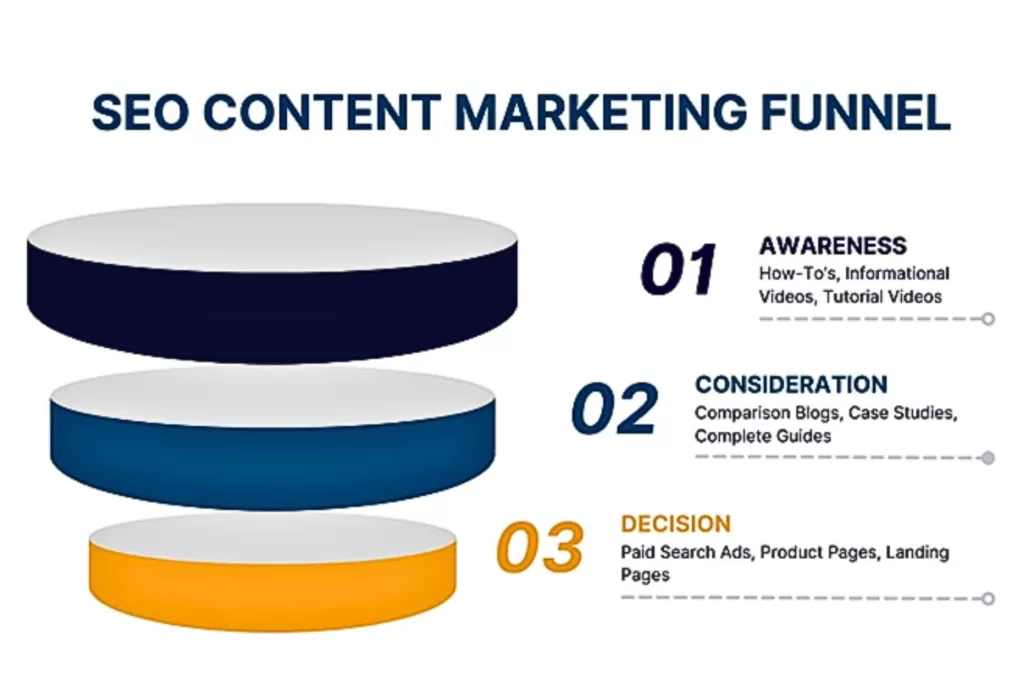
Here’s where common SEO content categories fall in the marketing funnel:
Top-Funnel (Awareness): How-to’s, informational videos, etc.
Middle-Funnel (Consideration): Comparison blogs, complete guides, case studies, etc.
Bottom-Funnel (Decision): Paid search ads, product pages, landing pages, etc.
When you understand your content goals and reader demographics for each piece, you can better solve their needs. It also sets you up for better success during keyword research, so you select the right search intent based on the funnel stage you’re writing in—which we’ll dive into more below.
Choose Your Web Page’s Topic
After determining your content goals, target audience, and funnel stage, brainstorm a general topic of what you want it to cover. This is the first step you’ll take when starting keyword research. You’ll end up finalizing the topic later once you have a target keyword.
Conduct Keyword Research for Target and Secondary Keywords
As mentioned above, your keyword research should do more than select the ones with the lowest keyword difficulty and highest search volume. While these attributes can find you great SEO opportunities, they shouldn’t be the only factors to consider if you want to target the best keywords in your content.
Below is a step-by-step process for effective keyword research and avoiding common mistakes.
Perform a Competitor SERP Analysis
In the first step of your keyword research, search for your general topic on Google and review the top SERPs—those are your direct competitors for this content piece. Also known as a competitor SERP analysis, it provides insights that Google is showing you what qualifies as top-ranking content for that topic. It’s like finding out the secret SEO sauce.
However, this doesn’t mean to copy what your competition is doing exactly. Google doesn’t reward duplicate content without added value, either.
Analyze the attributes that contribute to their higher rankings and see what they all share in common, including:
Word count
Headings
Backlinks
Visuals
Also, look for key details they might be missing where you can position your SEO content to outrank. Remember, Google prioritizes helpfulness and relevance. If you find that the competition is only providing surface-level details on the topic or lacks infographics to visually support the content, this can help your website rank higher in the SERPs.
Run a Competitor Content Audit
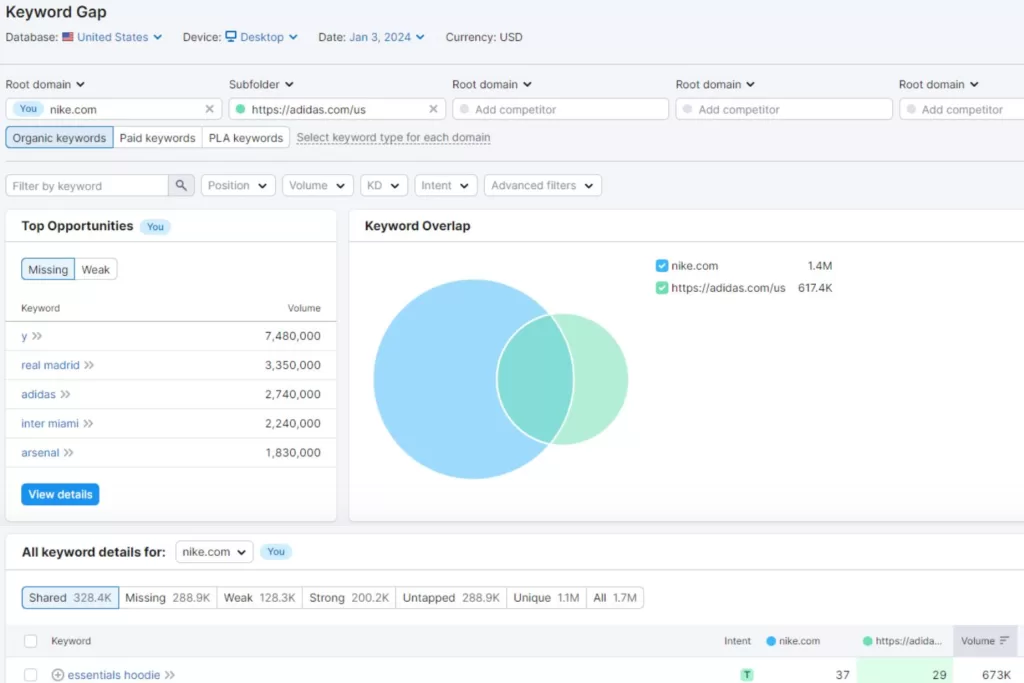
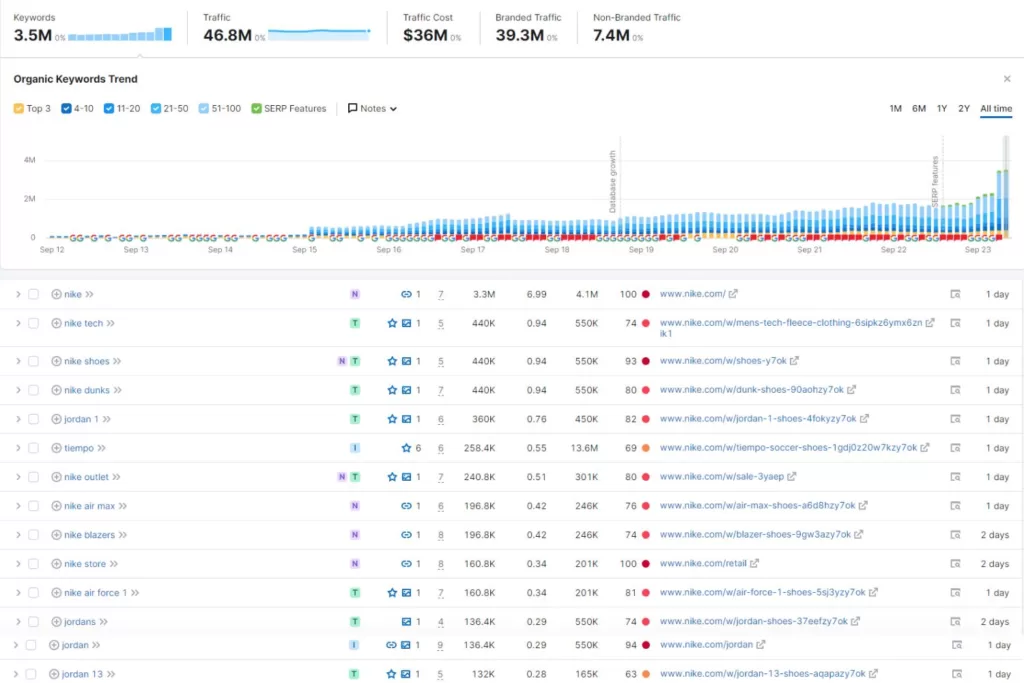
Next, take those top-ranking pages you found and do a content audit. Utilize SEO tools, like SEMRush and Ahrefs to analyze its performance. They have features like content gap and backlink analysis to see what’s contributing to its high SERP ranking with recommendations you can do to outrank.
Check for the following during a competitor content audit:
Backlinks: Check which sites are linking to their page and their Domain Authority so you can try to earn a backlink from them, too.
Keywords: Look at the keywords they used and build a keyword list to optimize yours with it, too.
Performance: Analyze the content’s performance metrics, including traffic and engagement (clicks, comments, shares) to measure the topic’s success.
With this approach, you’ll be able to streamline your keyword research process next.
Conduct Keyword Research
After a competitor SERP analysis and content audit, you now have a base list of target keywords. Don’t just copy the competition’s keyword lists. One of the most common mistakes brands make with keyword research is wrong search intent—the general reason behind a user’s search query.
While some content has mixed search intent, it’s not always the best-case scenario. For example, if you optimize a top-funnel (informational) blog with bottom-funnel (transactional) keywords, it can turn users away because it’s not relevant to what they’re searching for. They’re looking for helpful information, not product pages or shopping ads.
Remember, Google doesn’t reward irrelevancy if you use the wrong keyword search intent for your SEO content. Confirm the keywords are aligned with your content’s funnel stage by comparing the search intent.
Search intent keyword examples include:
Informational (Top Funnel): how-to, what is, tips
Commercial (Middle Funnel): brand vs. brand, best recommendations
Transactional (Bottom Funnel): for sale, buy, discount
You can also automate this process with SEO platforms, which tell you a keyword’s search intent. This way you know which keywords to use based on the persona’s funnel stage you’re targeting.
In addition to search intent and standard keyword metrics, like search volume and keyword difficulty, look for other types of keywords that can boost your content’s performance. Long-tail and question-based keywords are also effective keyword research strategies for SEO content writing.
According to a study, 92% of search queries use long-tail keywords to find more specific results. Keywords with low search volume and keyword difficulty can also be great low-hanging fruit opportunities to boost organic traffic in your website’s content—so don’t rule those out!
From there, you can build your finalized keyword list to select your focus and secondary keywords to optimize your content.
Update Your Content Outline
Now that you have your target and secondary keywords set, go back to your outline to update your content structure:
Create a title with your target keyword and search intent in mind
Write headings with focus and secondary keywords naturally
Add external and internal links you want to include
This outline will be the foundation you’ll need to finally start writing website content.
Write E-E-A-T Content With Your Audience in Mind
With the preliminary steps complete, you can now begin your SEO content writing process. If you don’t know how to write content for a website, reference Google’s E-E-A-T framework. It’s their content model that can help you create helpful and relevant information that their algorithms prioritize.
E-E-A-T stands for Expertise, Experience, Authoritativeness, and Trustworthiness. It’s designed to provide users with a higher standard of content and a better search experience when looking for information online.
SEO Content Writing Mistakes to Avoid
Many businesses always reference “high-quality content,” but do you know what that entails?
Examples of low-quality E-E-A-T content include:
Copying competitor content without added value
Long paragraphs with more than 5+ rows
Using too many internal links
Disorganized heading structure
Bullet point lists with no transition text in between
All the efforts you put into writing content for your website can harm its SEO performance if you’re making these mistakes when creating it.
How to Write Content for Your Website Effectively With an understanding of SEO writing mistakes to avoid, here are the best practices you should follow. Examples of high-quality E-E-A-T content include: ● Easy Readability: Small paragraphs and bullet point lists to share information in a visually digestible way. ● Organized Headings: Users should be able to quickly scroll through your web page and know what it’s about. ● Supportive Visuals: Aim for helpful infographics or use stock images relevant to your topic. ● Compelling Storytelling: Grab users’ attention with a hook statement in the introduction, a persuasive CTA in the conclusion, and smooth flows in between. You want to keep your readers engaged, so don’t make it harder for them to understand your content when it’s the solution they’re searching for.
Optimize Your SEO Website Content for Google
Once your content is complete, you must optimize it with on-page, off-page, and technical SEO. Optimization ensures search engines discover your content and provide it to users when using related search queries to your topic.
Optimize for On-Page SEO
On-page SEO is straightforward. It means optimizing the content on the physical page itself and involves a few different steps.
Keyword Optimization
Optimize your content with your target and secondary keywords naturally throughout the text. The amount of keywords you use should balance with your word count. Also known as keyword density, this prevents you from over-optimizing your content. As a rule of thumb, add one to two keywords for every 100 words.
Also, aim to have your target keyword as close to the introduction as possible naturally. It’ll help Google and your audience know what your content is about instantly.
In addition to your content, optimize your keywords in your metadata. This is the language that Google uses to better understand your content.
Best keyword optimization practices for metadata should include:
Title Tag: Keep within 60 characters to prevent it from being cut off in preview texts. Use your focus keyword.
Meta Description: Keep between 50 to 160 characters and use engaging language that persuades users to click through, like CTAs or a short summary of the solutions they’re seeking. Use your focus keyword.
Image Alt Tag: Keep it around 140 characters and use descriptive language so it’s accessible for all users online to understand. Look at the image and close your eyes to better describe it. Use your focus and secondary keywords when possible.
URL Slug: Keep between three and 250 characters, and don’t use special characters other than dashes. Use your focus keyword.
Keep all metadata sounding as natural as possible so it doesn’t sound forced by keyword stuffing.
Link Optimization
Like keyword density, your link optimization should also consider your word count. As best practice, aim to have five to six internal links per page to prevent overoptimization. Internal links help keep users on your website by navigating them to other helpful information related to the topic.
Add internal links to other blogs, case studies, and CTA in the conclusion—which is often a contact form, service page, or products. Use rich anchor text that’s relevant when hyperlinking to encourage users to click through so they know what the other page is about.
For external links, one to three per page is a rule of thumb. Always use reputable resources with high Domain Authority (60 and above) so Google recognizes your content as an authoritative and trustworthy resource—aka, E-E-AT. You can also use external links that your competitors are using from your content audit when possible.
Now you can finally publish your SEO content!
Optimize for Off-Page SEO
Off-page SEO is the optimization that occurs off your website. Examples of off-page SEO include social media posts and link building. However, the first step after publishing your content is ensuring that Google and users can discover it.
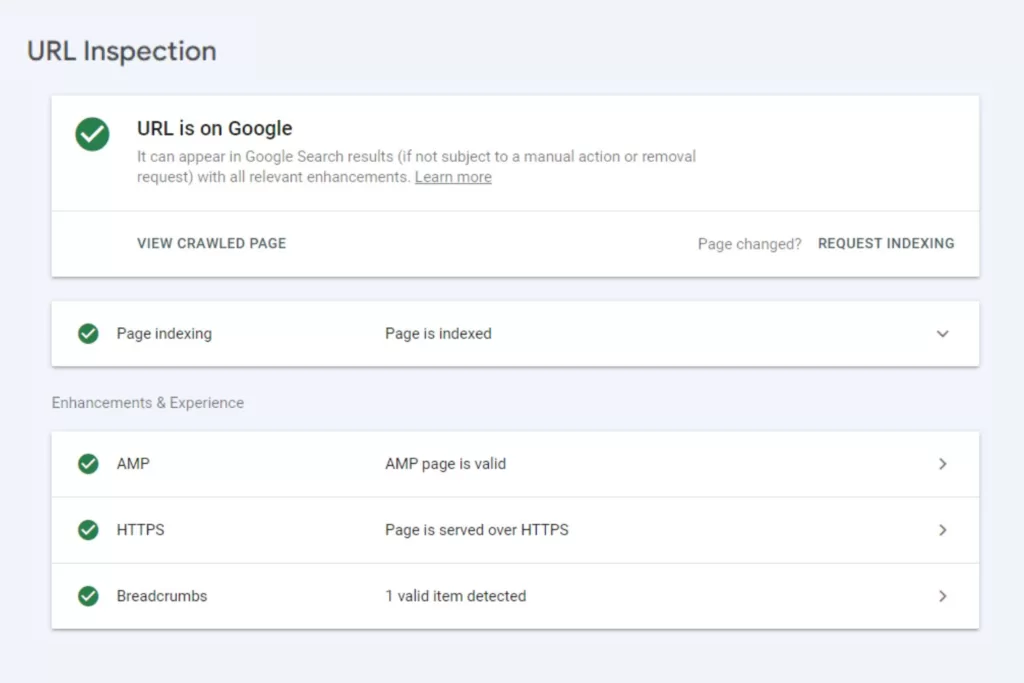
Request Indexing for Google
Once your content is published, always request indexing on Google Search Console (GSC). If Google can’t crawl (find your content) and index it (store it in their database), neither will your audience. You can monitor the status in GSC to see if there are any issues that Google has with crawling or indexing it.
Common indexing issues include broken links like 404 errors and duplicate content. GSC will provide reports so you know how to fix them, like replacing or removing broken links and editing duplicate content.
Invest in Effective Link Building
Link building is arguably one of the most important ranking factors on Google. When websites with high Domain Authority link to your site, it shows Google that you are an authoritative and trustworthy resource within your niche. In return, it generates referral traffic that has more qualified leads since a brand they trust is referring your company.
Social Media Posts: Offer cross-promotional social media shoutouts or include them in a campaign post.
Podcast Interviews: Find industry experts within your specific niche to form better relevancy for your target audience.
Broken Link Building: Contact websites you want to earn a backlink from by notifying them of broken links and offering to swap them with your site’s content.
When you only cold email outreach, you’re essentially asking for a favor as a stranger. Provide something of value in exchange instead.
Optimize for Technical SEO
Technical SEO is what happens behind the scenes of your website. This type of optimization helps how your web pages are displayed and ensures they provide a strong user experience (UX). In addition to easy content readability, it should be simple to navigate too.
Include the following in your technical SEO optimization:
Website Speed: Compress large image files or remove lengthy videos that aren’t adding value. Test the speed afterward on Google PageSpeed Insights for mobile and desktop.
Mobile Design: Test how your published content looks and performs on mobile to ensure it’s easy to read and navigate on all devices with breadcrumbs.
Website Analytics: Check if your site’s performance has a high bounce rate or low engagement. You can also review your top-performing pages and use those as a reference.
Users nowadays will quickly leave for a competitor’s site if your site has poor UX, making technical SEO a crucial part of your content strategy.
Reach Your Website Ranking Goals with Professional SEO Content Writing
While anyone can technically write website content, that doesn’t always mean it’ll give you the results you’re looking for. At Reach Marketing Pro, our SEO services include professional SEO content writing and optimization. We also focus on your website’s functionality so your content provides a stronger user experience.
Whether you need a persuasive product page or a compelling case study to showcase your successful track record, we can help you create high-quality SEO content your website needs to stand out.
Our team will keep you informed throughout the content creation and optimization process with monthly performance reports to measure and track success.
Ready to reach your SEO content writing goals?
Contact us to get better website content that ranks today!
Search generative experience (SGE) is Google’s AI search engine. Chances are you may have interacted with it before. But do you know how this impacts your business’s SEO and organic traffic? Adapting your SEO marketing strategies to automated technologies is essential as they influence user online behavior and algorithms.
SGE Google has different features than its standard search engine. AI-generated results empower SERPs by using advanced systems to understand human language and legacy algorithms more clearly.
However, it doesn’t replace traditional SEO. Google’s standard algorithms and SGE work together to deliver the best search results possible.
Artificial intelligence is disrupting the digital market landscape and isn’t going away. That’s why your business must invest in SGE to meet your audience where they are when looking for information online.
Here’s a complete guide to search generative experience and how to optimize your SEO strategies with SGE to drive organic traffic.
What is SGE?
People commonly ask, “What is Google SGE?” You may have heard of ChatGPT. SGE Google and ChatGPT are similar since they’re both AI learning tools that users can interact with conversationally for automated results. The difference is that ChatGPT is an AI-generated content-writing platform, and SGE is an AI-empowered search engine.
SGE vs. SERP: What’s the Difference?
Search generative experience and search engine results page (SERP) are both part of the search experience. SERPs are the pages Google displays in response to a user’s queries on a traditional search engine. SGE is Google’s AI search engine. It’s more experimental by using automated learning models and algorithms to deliver more relevant results.
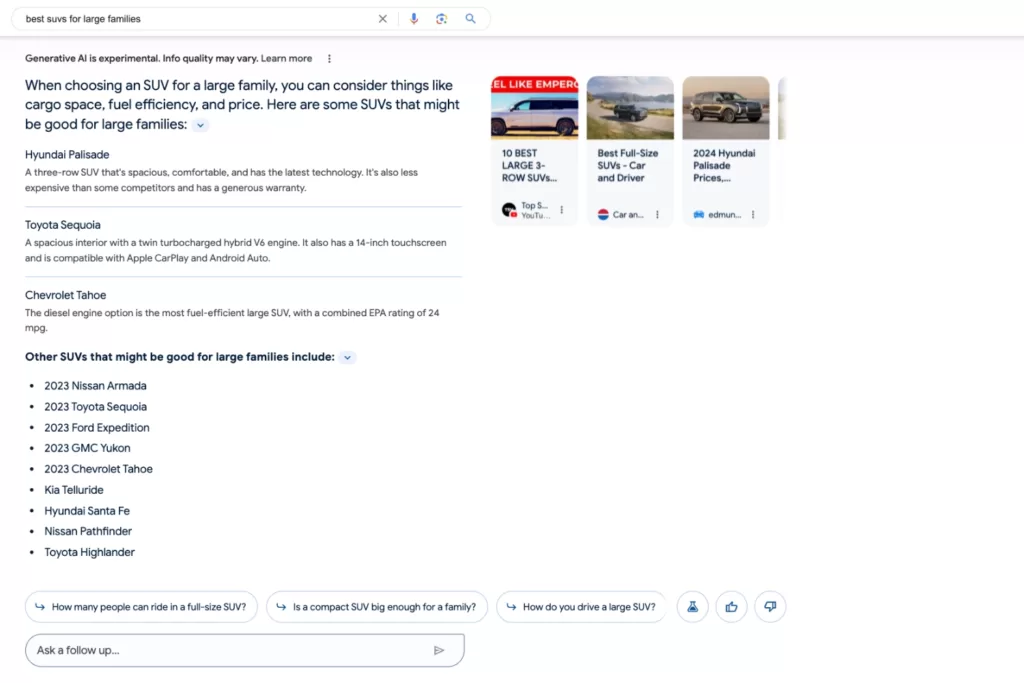
For example, SGE offers a more tailored experience for ad space. If you’re shopping online, SERPs often display rich results like product ad listings and reviews. SGE takes it further by showing you the same results, yet with more information. It includes follow-up questions, important product considerations, ad links, styling options, and more, all in one place.
SGE allows users to dive deeper into their online shopping experience. It displays snapshots of everything they need to know about a product in one location—instead of entering multiple search queries and clicking on multiple sites to learn more.
Google Search Generative Experience Features
Now that you have a general overview of SGE Google, next is understanding its unique features. With many advanced capabilities, it can improve your SEO performance and the bottom line. Here’s how:
AI-Powered Snapshots
AI-generated overviews of topics you’re searching to provide helpful information quickly. It gives you access to more diverse content like retailers, publishers, and businesses.
Follow-Ups
Users can ask follow-up questions in a conversational tone to gain context and refine their search results more easily. This feature allows you to explore deeper into the topics you’re interested in with related insights and web page descriptions to learn more.
Product and Local SEO Experience
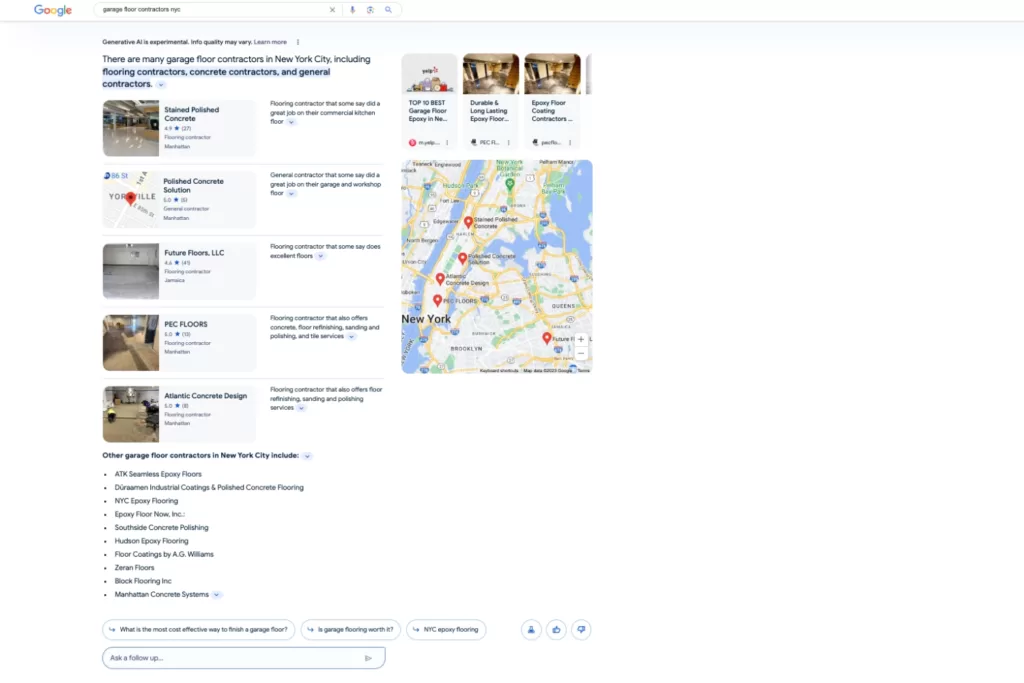
Snapshot overviews of products and Google Business Profile listings. E-commerce and local businesses can benefit from this feature by leveraging AI to create demand. It displays reviews, customer ratings, related information, and product images to influence faster purchase decisions in one centralized location.
Search Ads Experience
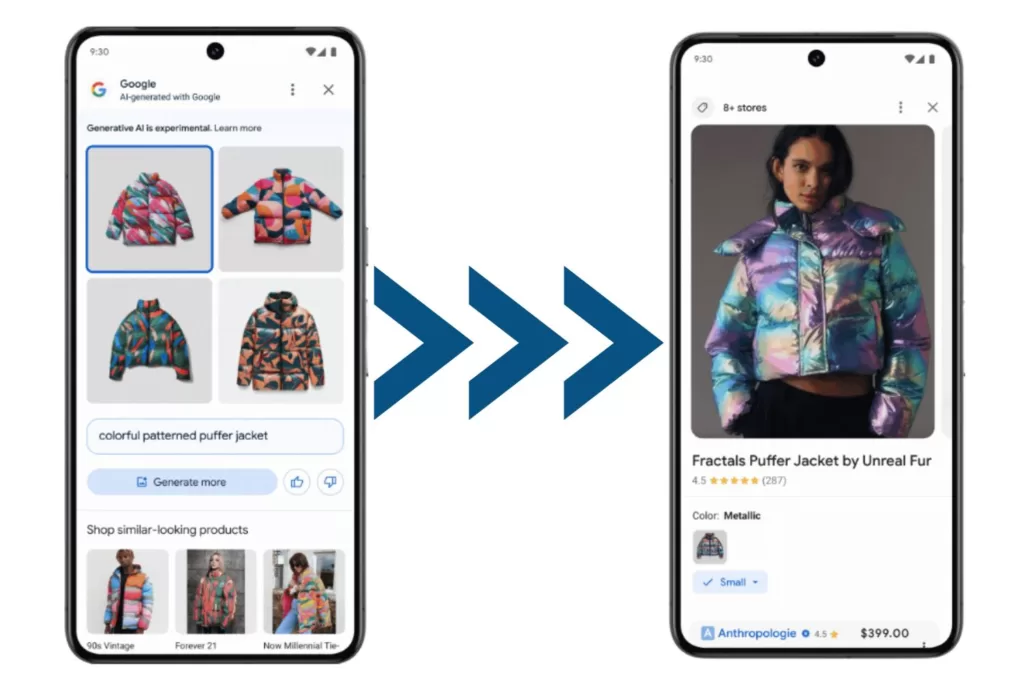
These are dedicated ad slots to provide more helpful information while promoting your business online. Users can also use product images they find on social media, blogs, and more to locate where they can buy them online. It directs consumers to product pages and shopping ads based on the image screenshot they enter.
This provides a seamless search ad experience when they don’t need to go on a hunt on where to buy items they’re interested in if they only have photos available.
Image Generation
AI-generated images help streamline visual marketing concept ideas and creative inspiration for your business. It’s like your automated graphic designer that creates any image you describe.
E-commerce brands can benefit greatly from this feature since customers can generate images of the ideal products they want and be navigated to the real versions of them. SGE Google links to related shopping ads or product pages based on the generative image search information consumers enter.
Common Concerns Businesses Have About Search Generative Experience
If SGE Google delivers a more tailored and automated search experience, why would users continue using traditional search engines? Business owners often think that SGE SEO will replace standard SEO. Here’s why that’s not the case and why you should integrate search generative experience into your SEO strategies instead.
SGE Concern: Taking Organic Traffic Away Your Website
Businesses commonly think that AI will replace digital marketing, especially now with SGE SEO. It’s understandable to fear that SGE will take away your organic traffic since users no longer need to visit websites for information when everything they need is in one place—making traditional SEO obsolete.
SGE Google cannot exist without humans. That’s why optimizing your site for SGE SEO is a necessary addition, not a replacement.
SGE Solution: Writing Quality Content for Google AI Search
Google search generative experience relies on human-written content to provide results. It takes your online information and displays it together while linking to the original content it generated from. SGE relies on people for it to exist. So, if your business stops creating content, it won’t have information to pull from.
Writing content for SGE Google makes it a helpful feature for business growth because it supercharges SEO.
Search generative experience only works because people enable it to!
How SGE Google Impacts SEO and Organic Traffic
While SGE doesn’t replace SEO, it does impact it. According to a study, 62.8% of SGE packs didn’t exactly match the content or keyword ranking of traditional local packs—including branded and nonbranded keywords.
There’s no standardization across SGE and SERPs. For this reason, local businesses should reconsider their keyword research and local SEO strategies for SGE separately. SGE packs don’t always match local packs, even if the search intent is obvious.
That’s why researching the SERPs and auditing SGE engines for target keywords is necessary for your SEO marketing strategy. If your business doesn’t adapt to AI generative search, you can miss ranking for local search queries that users are looking for.
In addition to local SEO, here’s how search generative experience impacts SEO and organic traffic in general.
Improves Organic Traffic Predictions
SGE Google is also a helpful analytics tool to measure your website’s SEO performance. Its impact analysis model provides organic traffic predictions by comparing them to your current traffic data. This framework predicts which keywords are most likely to increase and decrease your site’s traffic, including how much.
Strengthens SEO Performance
When you can analyze which keywords may be responsible for decreasing your website’s organic traffic, you can better optimize it before it’s impacted. By mitigating SGE risks that predict which keywords may be attributed to your organic traffic, you can strengthen your site’s SEO performance from an unexpected drop.
Identifies Strategic Keywords
Identifying the keywords impacting Google SGE’s organic traffic predictions the most can help your business rank better in SGE. Target keywords valuable to your business may not rank in SGE snapshot carousels as they might do in the top traditional SERPs. Keyword performance for SGE and SERPs may have different ranks.
With the SGE impact model, you can know which keywords you can’t afford to lose and which ones may be negatively impacting your SEO performance. By finding keywords contributing the most to organic traffic, you can strategically select better ones to optimize.
Streamlines SEO Efforts
When users can ask complex and descriptive questions more easily, they can understand topics or shop faster. Taking SGE’s suggested next steps or asking follow-up questions streamlines your SEO efforts because it’s less manual work for consumers to find relevant content. They’ll have all the information about your site in snapshot overviews to learn more.
How to Optimize Your Website for SGE Google
The first step to optimizing your website for SGE SEO is knowing how to get Google AI search first. Below is a step-by-step guide on how to access, download, and enable Google search generative experience.
Go to Google Seach Labs and join the waitlist to get access to limited-time experiments as an early tester. These features include “Add to Sheets,” where you can insert search results directly into spreadsheets, and Code Tips to automate programming language writing.
Google will send you an email when you’re off the waitlist.
Once you get Search Labs access, you can download Google AI search onto your Google Chrome browser with Incognito Mode turned off.
Click the New Tab at the top of the browser.
Click the Labs icon at the top right of the page.
Turn the experiment on by clicking the slider on the top of the SGE card.
You must sign up and in with a personal Google account as it’s currently not available to Google Workspace.
It may take time for SGE features to show up. Try doing some searches to see if it triggers AI-powered overviews—remember, these won’t always be available. Depending on your queries and the information available, SGE may or may not be triggered to deliver the best results possible.
You can also check if your experiments are on by clicking “Ask a follow-up” under the “Overview” section. Google suggests asking questions about a topic with different angles to consider. They recommend finding a range of relevant information, options, or viewpoints.
Once the experiments are available, you can begin optimizing your site for SGE Google. Here’s how:
Create High-Quality E-E-A-T Content
Did you know that Google recently added a second “E” to the now E-E-A-T framework? The second E stands for experience. This latest update shows that writing E-E-A-T content is essential since SGE is held to a higher standard for information quality.
The original E-A-T standard was expertise, authoritativeness, and trustworthiness. It’s how Google evaluates if their search ranking systems are providing helpful and relevant information. With updated search rater guidelines, Google now prioritizes the importance of original and helpful content for users that can be explained in various formats and sources.
Examples of low-quality E-E-A-T content include:
Web pages with misleading titles unrelated to the content
Pages that disguise ads as site navigation links
Copied or scraped content from other sites without adding original content or value
Keyword-stuffing content that doesn’t read naturally to people
Surface level details that force users to search more to find better information
Here’s to write high-quality E-E-A-T content:
Create helpful content with your audience in mind. Provide insightful analysis with original information that’s relevant to the topic.
Avoid copying and only rewriting content from external sources. Link to them, but add substantial value with a new perspective or educate further.
Write titles and headings as a descriptive summary of the page’s content. Users should be able to quickly scroll through your content structure and know what it’s about.
Make your content easily readable. Use small paragraphs of no more than four sentences with helpful visuals that support the content. Avoid fluff, irrelevant information, and unedited AI content writing.
Keep search intent in mind. Don’t spam users with sales promotions if you’re creating informational blog content on a specific subject.
E-E-A-T content creation is about providing an overall great page experience. Google rewards websites that provide this because you’re creating people-first content while demonstrating that you’re a trustworthy authority and expert in your niche.
Focus on the Most Important Keyword Rankings First
Sitewide SGE audits and optimization can seem daunting. Start by identifying the most important keyword rankings you can’t afford to lose first. Then audit one page at a time for an organized process of SGE recovery.
After conducting an SGE analysis, record your high-impact keywords, and optimize your existing pages with them. Then, rerun your SGE impact analysis to measure its new SGE SEO performance. Check if you’ve reduced the number of lost keyword predictions to ensure you’re on the right track.
Invest in a Solid Link building Strategy
Backlinks are arguably the most important ranking factor in SEO. Go above cold email link acquisition with solid linkbuilding strategies. Try offering social media shoutouts, podcast interviews, email newsletter blasts, and free link exchanges to offer a higher value in return.
This helps show Google search generative experience that you’re creating high-quality E-E-A-T content.
Review Your User Experience (UX)
If users have difficulty navigating your website, SGE optimization won’t be impactful if they can’t find what they need. Signs of poor user experience (UX) include high bounce rates, slow page load speed, and complex mobile design. When performing SGE audits, review your UX to prevent pushing traffic away when users click through SGE into your site.
Optimize Your Site’s Metadata
SGE and SERP rely on metadata to better understand your site’s content because it’s written in search engine language. If Google can’t properly crawl your site through metadata, it won’t generate in SGE to consumers using relevant queries.
Here’s how to optimize your site’s metadata:
Write valuable and enticing meta descriptions for each web page to engage users to click through, like hook statements and calls to action.
Include target keywords in your title tags, page content, and headings naturally, without over-optimizing. Don’t force keywords into your copy if it doesn’t sound right out loud.
Create image alt tag descriptions with target and secondary keywords for audience accessibility.
Remember, if Google can’t find your site, your audience and SGE won’t either.
Elevate Your Business’s Google Search Generative Experience
Transforming your business’s online presence for SGE Google is a must with evolving AI technologies. At Reach Marketing Pro, we have extensive experience with SEO optimization, including on-page, off-page, technical, local, SEM, and SGE.
We also focus on website functionality for a stronger user experience because SEO isn’t only about climbing Google’s ranks. Our team takes your site’s information and products to optimize it with your business’s SEO goals and branding in mind.
While we do all the work, we keep you informed throughout the optimization process and provide monthly performance reports to measure and track success.
Ready for your business to be an early adapter of AI search?
Contact us to take the first step into your Google search generative experience today!
Have you ever been online shopping, and the payment process required you to create an account before purchasing? Or, have you ever compared two similar products, and the descriptions weren’t clear enough on the differences?
Whether it’s a lack of guests and one-click checkouts to confusing product offerings, these are signs of poor user experience on an e-commerce website. This is one of many site design issues that can turn potential customers away and buy a similar product from your competitor.
So, how do you know which e-commerce platform is best? Here’s how to pick the right one including, features, recommended website builders, and tips to consider before buying.
What Makes a Good E-Commerce Platform?
Website development can be complex, especially if you don’t know how to build a website and what the process looks like. Even if you’re not tech-savvy, website builders are designed to be user-friendly for anyone to make one on their own.
However, this is just a starting point. It’s up to you to customize your online store’s brand and ensure it pushes products at the forefront of what your target audience wants.
Here are a few features to look for in an e-commerce platform and why they come in handy during the development process:
Budget
While budget may seem obvious, e-commerce platforms have varying prices and add-on costs depending on the package you purchase. Create a list of must-have and nice-to-have features for launch, and compare which builder can give you the best options based on your financial needs.
Ongoing Website Support
An e-commerce platform should have helpful support forums and an easy way to contact customer service for questions and challenges you may have during and after development.
UX/UI Design
As mentioned above, an e-commerce website with a strong user experience is foundational to the bottom line and can increase conversions by up to 400%. Can customers easily shop online through their smartphones? Or does it load products slowly and display them in a scattered design? If it’s difficult for you, pick another e-commerce platform that won’t push potential customers away.
Analytics
An e-commerce website’s performance analytics is fundamental to measuring success. Review the reporting and features the platform provides to ensure you can track key metrics and KPIs that are important to your online store.
E-Commerce Website Features
After preparing for development, understanding a site builder’s features must also be considered. From checkout customizations to drop shipping, these are some functionalities to look for as an e-commerce business.
SEO
If your online store isn’t optimized for search engines, it’s virtually invisible. That’s why it’s imperative to buy the best e-commerce platform with SEO features and functionalities. From metadata to custom URLs, investing in SEO is required for any website and business to succeed.
Previous Experience with Website Builders
If you have prior website development experience, check how easily an e-commerce platform can migrate from one site to another. Depending on your website size and complexity, some builders may charge a fee or not offer migration services at all.
Keep E-Commerce Platform and Software Fees in Mind
When searching for the best e-commerce platform, understand that software fees and different charging systems are involved. While it may seem tempting to pick the cheapest or free ones, these most likely won’t have the necessary features and integrations your online store needs.
Remember, you get what you pay for. And as an e-commerce business, investing in your website is an extension of your brand’s success. Below are some common payment/fee structures for e-commerce website builders and how they work.
Monthly Fees
Depending on the website package you purchase, monthly fees will vary as each has specific offerings. The more inclusive the package service offerings are, the higher the monthly rates will be.
Transaction Fees
E-commerce platforms that process payments for you charge through a per-transaction fee, typically a percentage of each transaction. There are also payment processing plug-ins that may be more cost-effective than purchasing through a website builder.
Payment Gateway Fees
A fee system that charges for every online transaction the platform authorizes. Payment gateway fees are charged for every debit/credit card they authorize, while transaction fees charge for every completed purchase.
5 E-Commerce Website Builders We Recommend
Now that you know what to look for in a website builder, here are five of the best e-commerce platforms we recommend:
1. Shopify
Shopify is one of the most widely used e-commerce platforms available. If you have a large product inventory or an enterprise-size online store, Shopify allows you to manage up to 1,000 locations and has over 6,000 ready-to-install plug-ins. Even small businesses can benefit from this platform with streamlined fulfillment, shipping, and inventory management in one centralized place.
2. Squarespace
Squarespace is one of the easiest platforms to work with. They offer plenty of user-friendly template design customizations and a large inventory management system. However, if scalability is a priority for your online store, other website builders may be more beneficial.
3. BigCommerce
BigCommerce is a high-performing e-commerce platform that’s built for retailers. Although it’s higher in cost, the returns you can receive are highly valuable. They don’t require additional platform fees like Shopify and offer built-in features to prevent pricing increases or add-ons.
From seamless social media integration for multi-channel cross-selling to strong technical SEO features like automated redirects, this web builder is ideal for larger online stores and those with prior development experience. So if you’re selling small-scale, have a lower budget, and looking for a simple web build, this may not be the best option.
4. WooCommerce
WooCommerce should be your go-to choice if your online store is built on WordPress. It’s a plug-in that integrates with WordPress easily for online shopping carts, abandon cart emails, customer rewards, and more. But, development is more complex compared to other platforms due to its highly customizable features.
5. Wix
Wix is the cheapest e-commerce platform option with monthly plans starting as low as $27 per month. With over 250 free applications and social media channel integration, this is the ideal beginner website builder if you want basic features.
We Can Build Your E-Commerce Website for You!
As a business owner, a new website is an exciting time. But, we understand you may not have the time to build one. You have to focus on your trade and managing the company.
At Reach Marketing Pro, we have extensive experience with building e-commerce and non-e-commerce websites. Our web design and development services can create your online store while showcasing your unique brand. We ensure not only the best marketing strategies (SEO, SEM, Social Media) but also the website’s functionality to make a lasting impression on users.
We’ll take all your company information and products to create a website with your business and audience in mind. While we do all of the work, we’ll keep you informed throughout the development process.
Ready to kick off your new e-commerce website journey?
Don’t get overwhelmed by the details. For small business owners, it’s common to not know how to create a website. You have to focus on managing the company and providing expertise in your trade.
However, there are steps to prepare for the best web development experience and results possible— and it’s easier than you might think.
A new web build is an exciting journey and can provide marketing opportunities, especially for small business owners. It’s an extension of your brand, mission, and products/services, which is crucial in an evolving and competitive digital marketplace. Consumers today expect a solid first impression before buying, and your website might be their first experience with your brand.
Whether you’re utilizing a web designer and want to educate yourself or considering DIY, here’s a complete guide to small business website development in just 11 steps.
Must-Have Details to Gather Before Your Website Build
Before building a website, it’s practical to gather business details first to determine the type of site you need. For example, small e-commerce brands can benefit from creating a Shopify website. Shopify’s features include mobile-friendly product page design templates and payment gateways that are designed for e-commerce businesses. Company details, such as how many products or services you offer, also determine the website size you need.
Here’s a pre-website build checklist to help guide you before development:
Web Hosting: Pick a domain name (website name/address) and register it with a web hosting provider.
Web Designer: Who is responsible for the web build and design?
Website CMS: Which CMS (content management system) platform will you use? Ex: Shopify, WordPress, HubSpot, etc.
Company Brand: What are your branding guidelines? Gather your brand colors, fonts, logo files, visual do’s/don’ts, content rules, and reference sites for design inspiration.
Website Trends: Research current web design trends to ensure your site meets new consumer demands and search engine algorithm updates.
Site Maintenance: How committed are you to maintaining and updating your website as needed? Who is responsible for this?
Web Content: Do you have current marketing collateral? Are you committed to creating unique content for your website?
Website SEO: Do you know how to properly optimize your website for search engines and keep up with competitor SEO rankings?
Website UX (User Experience): Can users quickly navigate your website and not feel overly spammed?
While this may seem like a long or detailed checklist, it’s worth it. The more you prepare before a website build, the better the process is. Simply gather this information into designated folders and your web developer will have everything they need. It also eliminates the need for further back-and-forth on missed items.
How to Build a Website for Your Small Business in 11 Steps
Now that you know the information needed before a web build, we’ll explain how exactly a website is created. From design inspiration references to domain name registration, here’s how to build a website for your small business in 11 steps.
1. Identify Your Target Audience to Understand Your Traffic Sources
Do you know who your ideal customer is? Understanding your target audience is crucial to web builds because it should be designed with them in mind.
Dive deeper into your buyer personas. Address their common questions and challenges so you can provide related and specific solutions through your website. This way, you can drive potential traffic with more qualified leads since you understand what influences their online behavior.
Define your business goals for your website. Whether it’s selling products or offering services, identifying your target audience is the foundation of creating a successful website. It determines how you’ll connect and persuade them to engage with your site.
2. Research Competitor Sites for Design Inspo and Marketing Opportunities
Certainly, don’t copy what your competitors are doing with their websites. Avoid using the same color scheme, exact layout, and images. However, it’s beneficial to have visual inspirations for how you want your website to look. This way your developer understands the creative design and structural direction you’d like to incorporate.
Researching your competition is also an effective marketing strategy to uncover missed opportunities in their web design. For example, if you’re a boutique e-commerce brand and discover that your competitors don’t utilize one-click checkouts, this can be a great opportunity to provide a better online shopping experience.
One-click checkouts can increase transactions by 25.8% since customers aren’t burdened to create an account before buying— resulting in reduced abandoned carts and checkouts. Finding ways to make your website look and perform better is key to outdoing the competition and prioritizing your products or services.
3. Select a Domain Name that Represents Your Brand
A domain name is more the name of your website address. It represents your brand and determines how users feel about your business based on a name alone. Domain names also cannot be changed or modified once you register them. For these reasons, it’s critical to select a domain name that accurately represents your company’s identity, mission, and values.
Consider the following when picking a brandable domain name:
Make it simple, short, and impactful: Make a memorable and brandable domain name under 15 characters.
Aim for a “.com” TLD when possible: Top-level domains (TLDs), like “.shop” for e-commerce brands or “.org” for non-profits, can be suitable options if “.com” is taken.
Avoid long or hard-to-pronounce words: Prevent users from misspelling your website or making it harder to find.
Don’t include slang, numbers, or hyphens: Focus on a seamless user experience so consumers can access your site easily.
If you need inspiration, there are domain name generators, like Shopify and Wix, where all you need to do is enter a keyword, and creative options are prompted. However, you must ensure that a domain name hasn’t been taken by checking if it’s registered online.
4. Register Your Domain Name with a Web Hosting Provider for Copyrights
Now that you have a domain name in mind, the next step is registering it so you own the copyrights and trademarks. But before you do, confirm it’s available by checking its registration. A common source to verify if a domain is already registered is through domain name search tools like GoDaddy or ICANN.
There are options if you want a domain name that’s registered:
Buy it from the owner: If the brand is inactive, has a dated website, and has no social media presence, there’s a chance the owner might accept an offer.
Use different TLDs: If “.com” is taken, try registering with “.shop,” “.co,” and other authoritative TLDs.
Consider name variations: Brainstorm other creative versions of the domain name you want. Make them specific to your niche to avoid duplication.
Once you verify a domain name isn’t registered, it’s available for purchase. Popular website hosting platforms, such as BlueHost and Hostinger, offer tools that automatically register domain names for you.
Domain Hosting
Content Hosting
Website address
Website CMS (content management system)
Domain names cannot be changed
Edit content without markup or programming
Hostinger, SiteGround, BlueHost
WordPress, Drupal, PrestaShop
Some hosting platforms, like GoDaddy and Squarespace, also provide CMS systems. It may be a beneficial option to consolidate your website marketing services, especially if you don’t know how to build a website. Ensure you compare all options that are best for your needs and budget.
5. Choose Your Content Hosting Platform for Simple Content Management
In addition to a domain hosting provider, you’ll also need a content hosting provider—also known as a CMS (content management system). The difference between domain vs. content hosting is their functionalities and customization.
A domain hosting provider hosts your website on a server to function properly. While you can change hosting providers, domain names cannot be changed or modified once registered.
A content hosting provider stores your website’s content and shares its files, and hyperlinks pages. Its purpose is to give website owners easy access to edit their content without the need for marking up or programming languages.
Each content hosting site has various capabilities, plugin updates on their platform, monthly/yearly fees, and more. So, when picking a content hosting site, consider the must-have functionalities that are key to your business, like simple SEO plug-in integration or user-friendly blog management.
6. Create a Skeleton of Your Site for Streamlined Web Development
A skeleton is a visual roadmap of what your website design will look like. The purpose of site skeletons is to streamline the development process so business owners can see how exactly their website will be laid out. It helps with revisions or new design changes before placing it on the content hosting platform.
Here’s what you should consider when reviewing your site skeleton:
Do you have an eye-catching homepage that quickly explains what you do as a company?
Is your branding clear?
Are the products/services you provide easy to find, read, and clear?
How much content do you have that will be displayed throughout the site?
Do you have testimonials, FAQs, press releases, or blogs you want to feature?
How will a customer/client contact you?
While website updates are doable after launch, having a preview design through skeletons can reduce the need for more revisions before content uploading.
7. Optimize Your Website for Search Engines and Online Visibility
After finalizing your small business web design, the next step is to ensure search engines can effectively find and store it through off-page, on-page, and technical SEO. If search engines like Google can’t discover (crawl) and store (index) your website in their database, it’s virtually invisible to users online.
Use a mobile-first approach to your design and site responsiveness
Index all web pages in Google Search Console for indexing and crawling (off-page SEO)
Invest in technical SEO with fast loading times and site breadcrumbs for easy navigation
Implement on-page SEO by writing optimized page titles with target keywords
In addition to visibility and traffic, website optimization is crucial to keep up with your competition. By maintaining best SEO practices, you can promote competitiveness by ranking for similar keywords while building your online presence.
Business websites that rank at the top of their niche’s SERPs (search engine results page) generate a 39.8% CTR (click-through rate), while second ranks receive 18.7% and third at 10.2%. Optimizing your website isn’t only for search visibility and keyword rankings. It’s also an effective SEO strategy to increase engagement and leads.
8. Create and Add Content to Your Website That Aligns with Your Brand
Every website needs content. Whether you’re repurposing old marketing collateral or writing unique content, each web page needs written text and visuals. This includes home pages, product/service descriptions, graphics, page headers, and blogs. After creating and reviewing your content to ensure it aligns with your brand and business, place it throughout your website. Remember to optimize your content to ensure search engines and users can discover it.
9. Review Your Website on Mobile and Desktop for a Better User Experience (UX)
Check your website multiple times across several devices, including mobile and desktop. Review the site layout on your computer, phone, and tablet to ensure easy navigation and strong user experience (UX).
UX is the user’s overall experience when interacting with a website or application. It plays a critical role in maintaining customer satisfaction and may push potential new ones away. If not, it’s considered in your site design.
For example, conversion rates drop an average of 4.42% for each additional second of page load time. If your site has slow web response rates, low-quality images, or irrelevant content, these are signs of poor UX design. Websites with strong UX design can increase conversion rates up to 400% because they’re designed to be simple to navigate and easily accessible.
Some ways to improve UX design for small business web development include:
Create Flowcharts: Use these visuals in your site’s skeleton to decide how users will interact with your site for the optimal experience.
Conduct Interface Tests: Gather data on the experience quality of your site and compare the effectiveness compared to other user interfaces.
Create User Surveys: After launch, chat with potential and existing users of your system to gain feedback for UX improvements.
Before launch, get a close friend, colleague, or relative to view the staging link on their devices and provide feedback. Getting a fresh perspective can uncover UX design issues you may thought were working but are invisible to the user.
10. Launch Your Website to Make it Live!
Once everything is reviewed, added, and to your liking, click that “Publish” button! Congratulate yourself or your team for this major business accomplishment. After launch, it’s essential to monitor your new website to ensure it’s running smoothly.
Here’s a post-website launch checklist to help guide you:
Submit your site to Google Search Console for indexing and crawling
Monitor your site in Google Search Console for any design errors, like duplicate pages or broken links
Setup Google Analytics with your site to monitor its performance and gain valuable data
Spread the word on social media as part of your off-page SEO strategy
Regular updates are an ongoing process after you build a website for your business. From content marketing to structural improvements for UX, a site launch isn’t the end of the process but the beginning of a new chapter.
11. Plan for Regular Website Maintenance After Launch
All websites will have regular maintenance, including plug-ins, platform updates, backups, product/service changes, etc. However, if a consumer finds a business with a website that seems outdated, has broken links, or slow loading, they’ll most likely move on to another competitor. Keeping your website regularly maintained is easier than a complete revamp.
Let Website & SEO Experts Handle Your Website Build for You
With these steps, you can streamline your small business web design. But as a business owner, we understand if you don’t know how to build a website— and you shouldn’t have to.
Professional web developers have expertise in custom mobile-responsive design and plugin integration that you can’t do on your own or as easily. They can create unique site features to make your brand stand out and ensure its structure meets search performance requirements.
At Reach Marketing Pro, we’re a full-service digital marketing agency and can guide you every step of the way. From website design concepts, content creation, monthly site updates, and SEO optimization, we help ensure our clients are successful in providing the best user experience for potential and returning customers.
Skip the hassle of creating a website and let our SEO and web development team do it for you. Our developers provide superior design, webmaster services, and site management to handle all of your website’s needs. This way you can focus on what you do best, your trade.
Contact us to kick off your new website journey today!
There are many reasons why you would want or need to block a website. For example;
Parental Controls: If you have children, some websites contain explicit content that you want to keep them from.
Increase Productivity: Permanently or temporarily block certain websites to improve your productivity time for studying or working.
Suspicious Sites: Save yourself from attempts at infecting your computer with a virus or stealing your personal data.
Which Site-Blocking Method is Right For You?
Each method of site blocking will vary based on its restriction, the users, and the device you’re using. For example, if you want to block websites temporarily or permanently on an individual device, it’s recommended to install a more configurable program or easy-to-use browser extension.
If you want to block manually through the host’s file, firewall, or router, it’s a good option if you don’t want to deal with software. However, this method is only suitable if you want to disable access to certain sites permanently.
If you’re blocking certain sites for multiple users on a single network, you should use either web filtering software, which is normally used by businesses or schools, or block through the router.
How to Block Websites on Your Browser
Chrome
Log in to your Google Admin Account and go to the Chrome browser homepage.
Choose which users you want to block from visiting certain websites.
Find the URL Blocking section.
Enter the web address you want to block in the Blocked URLs tab.
Save the changes.
Firefox
In the Options page, select the Privacy & Security tab.
Scroll down to the Permissions section and click the Block Websites option.
In the Block Websites page, enter the URL of the website that you want to block, and then click the Add button.
Safari
Go into the Content and Privacy section of Screen Time.
Click Customize to block specific websites.
Click the “+“ under the restricted section to block specific sites.
Add the URL of the site you want to block and click OK.
Select OK again to finalize your decision to block a site.
Internet Explorer
Open the browser and go to Tools (alt+x) > Internet Options.
Click the Security tab.
Click the red Restricted Sites icon.
Click the Sites button below the icon.
Now in the pop-up, manually type the websites you want to block one by one.
Click Add after typing the name of each site.
When done, click Close and click OK in all other windows.
Blocking Websites on Your Mobile Device
When using an Android and or iOS device, you will need to download specific apps to block unwanted websites. Thankfully, most apps can work across multiple browsers! Here are a few examples of apps and their features:
Choose your family member then scroll down to Content Filters.
Toggle on Filter Inappropriate Websites.
To block specific sites, add their URLs under Blocked Sites.
You can block access to specific sites by turning on the Only use-allowedwebsites toggle.
Add URLs of approved websites under Allowed sites.
Parental Controls on a Mac:
Click the Apple icon and select System Preferences.
Click the Parental Controls icon.
Click the lock symbol and enter your password.
Select the account you want to filter with parental controls.
Click Enable Parental Controls.
Additional Methods to Block a Website
In addition to the above, there are additional ways to block unwanted websites. Here are some ways to do that.
Using Browser Extensions: Using specific extensions on your browser helps block certain websites you don’t want other users to visit. For example, BlockSite is a Chrome Extension that helps block web pages and limit adult websites individually or by categories.
Using Productivity Software: Using these samples will help reclaim your productivity and steer away from potentially dangerous websites; Freedom, Forest, PawBlock, RescueTime, Pause, Focus, etc.
Leverage Web Filtering Software: These help block unfiltered websites from being accessible on your computer. Examples include WatchGuard.
Let Our Team Help You Gain Productivity Time
When working with Reach Marketing Pro, you’ll know your privacy and security always come first. We have the skills you need to strategize, analyze, and curate creative designs for your business, giving you back time to focus on what’s most important!